Verbinal for Linux 1.4.4 is a release about being told things at the moment they happen, and about finding a container image you can actually run. It also installs on Arch and Omarchy for the first time — that half has a guide of its own.
Notifications arrived late, and sometimes not at all
The Portal learned that a session had started or a job had finished by polling. Every notification it raised was a side effect of that poll, which means the poll interval was the delay: a finished batch job was announced up to 45 seconds after the fact, a session up to 15. Long enough that the notification reads as being about something else entirely.
Worse, a job that started and finished inside a single window was never observed in a running state at all, so no transition was detected and nothing was raised. It simply appeared, already done.
The cadence now follows the work: five seconds after something changes, easing off as nothing does, and back to a slow tick when nothing is in flight. Measured over a five-minute watch, the worst case fell from 45s to 19s and the mean from 22s to 9s — with each surface's ceiling at or below the fixed interval it already ran at, so nothing can arrive later than it did before.
Two things that timing had been hiding came out with it. The session strip stopped polling entirely once nothing was pending, which is why "session expiring soon" could only ever fire by accident of some other session happening to be pending at the time. And a session that had failed before the app started was announced on every launch, because the check asked "is it failed, and was it not failed before?" — a question that is trivially true about a session the app has never seen.
Toasts stopped queueing, too. The overlay shows one at a time, so in a burst the sixth reached the screen half a minute after the thing it described. A new message now replaces the one on screen, and an exact repeat is dropped rather than resetting its clock.
An images list you can actually search
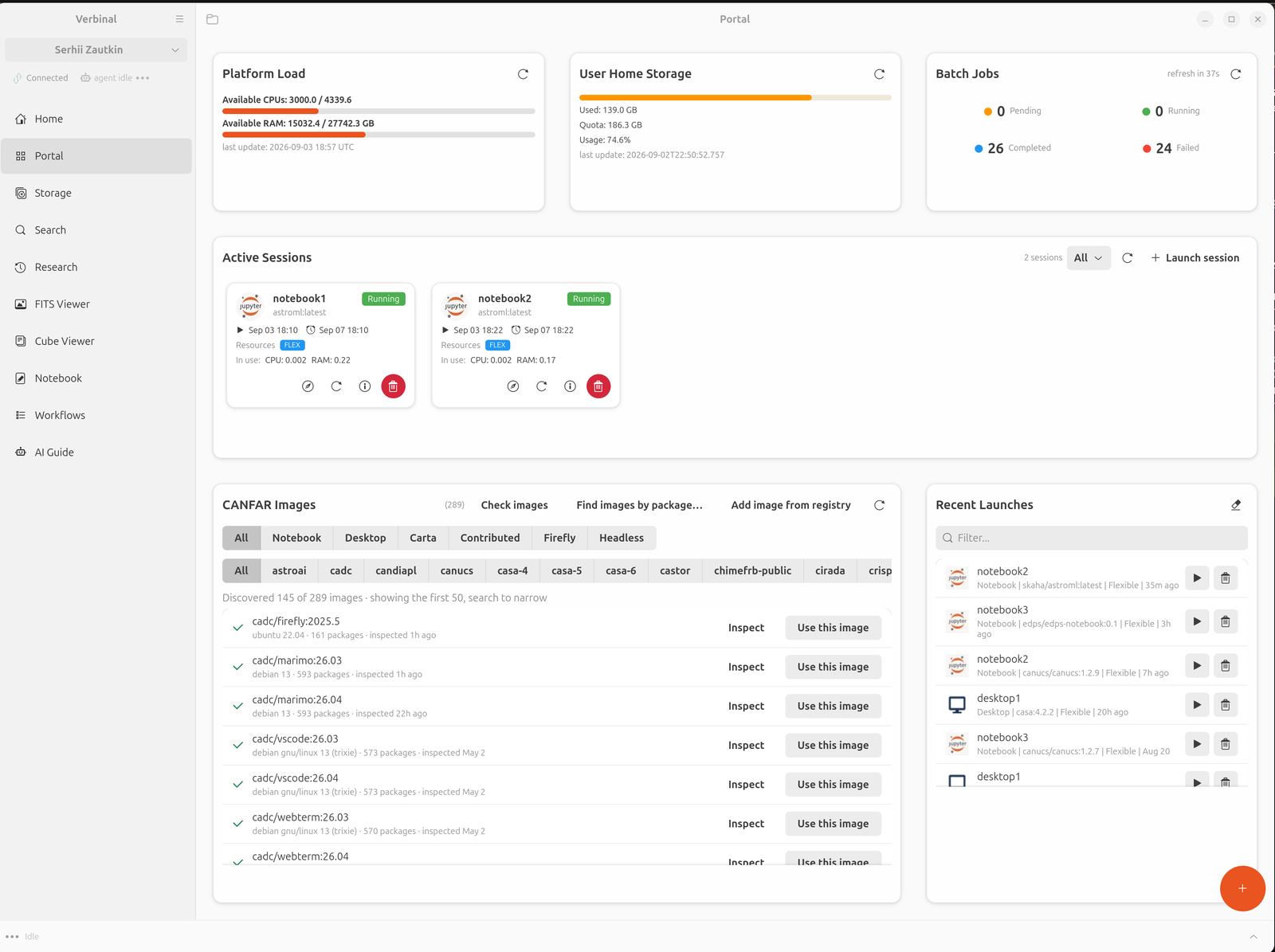
The CANFAR Images card listed all 365 images the platform returns. Seventy-seven of those carry the desktop-app label and nothing else — an application published inside a desktop session, not a session you can start. Every CASA tag back to 3.4.0 is one of them. They made up a fifth of the card, they padded the type filter, and pressing Inspect on one spent a real probe job on an image no launch tab would ever offer.
The card now shows what the launch form can offer, and carries a second filter row for project, built from whatever the type filter leaves. There are 21 projects behind the catalogue and the two largest hold 60 images each, so the session type alone never narrowed it enough to browse. Picking CARTA drops the project row from 21 buttons to 2.
Images the platform does not publish
Skaha publishes a curated list. The container registry behind it holds a great deal more, and until now an image the platform had not picked up could not be reached from the app at all, however precisely you knew its name.
Add image from registry searches that registry — only when you ask, never on a timer and never as you type, because enumerating a shared registry to populate a dashboard card is a lot of traffic to answer a question nobody asked. What you add joins one merged catalogue that the images card, the package search and the launch form all read, so an added image is launchable everywhere at once rather than listed in one place.
Clicking an image row now opens what is inside it: OS, capabilities, conda environments, and packages by ecosystem. The median image here holds 624 packages and the largest section 960, so the view leads with a filter rather than a list, builds its contents as you open each section, and leaves out ecosystems that are empty in every manifest instead of rendering "R (0)" forever.
Asked which image is best for spectra on M51, an agent would search for "spectroscopy", get zero results and zero near-misses, and report that no image does it. Nine of them carry specutils.
Two new tools for agents
That failure is worth dwelling on, because the tool was working exactly as designed. find_images_with_packages matches real package names, and nothing gave an assistant any way to learn what those names are. A subject word finds nothing, and nothing is indistinguishable from a definitive no.
search_packages is the vocabulary that was missing: package names and how many images carry each. Names that begin with the term lead, because ranking by count alone puts jsonschema-specifications (71 images) and fsspec (56) above specutils (9) — the packages in the most images are Python plumbing that nearly every image happens to carry, which is exactly what does not distinguish one from another.
describe_image answers the question that follows: not which images match, but which of them is the better fit. That turns on the OS, on what else is installed beside the match, and on whether the image was ever inspected at all.
Launching
The launch form used to sit on the Portal taking up two thirds of the page whether or not you were launching anything. It opens as a dialog now, from one clearly marked button beside the list of sessions it adds to. An earlier attempt put that behind a floating button; it carried no label, sat away from anything it related to, and a user who never noticed it had no way in at all — so it is gone.
The dialog answers in place rather than opening a second window over itself. A launch used to raise its own confirmation dialog on top of the launch modal, wait two seconds, close itself, and then close the modal underneath: two windows to dismiss for one action.
Installing
On Ubuntu 24.04 and newer, download the .deb from GitHub Releases:
sudo apt install ./verbinal_1.4.4-1_amd64.debThe leading ./ is the part people miss — without it apt looks for a package by that name in the archive. It pulls in any missing dependencies in the same step, which is why it is preferable to dpkg -i followed by apt-get install -f: the same job in two commands with a broken state in between.
Everything Verbinal needs is in Ubuntu's own archive: GTK 4, libadwaita, glib and cfitsio. libgtk-4-media-gstreamer is recommended rather than required — it plays the agent's sound cues, and without it the app is silent and otherwise unchanged.
On Arch and Omarchy, Verbinal has its own signed pacman repository. That is a guide of its own.
Verbinal for Linux is free software under the GNU Affero General Public License v3.0. There is no telemetry anywhere in the app, your CADC token lives in the system keyring rather than a config file, and the data you open in the viewers is read and rendered on your own machine.
Get Verbinal for Linux 1.4.4
Free and open source under AGPL-3.0. GTK 4.12+, libadwaita 1.4+, and a free CANFAR account. Search and both viewers work without signing in — and your data stays on your machine.