
Verbinal for Linux has installed from a .deb since its first release, which is fine if you run Ubuntu and no use at all if you do not. As of 1.4.4 it installs on Arch and on Omarchy from a signed pacman repository, and it updates with pacman -Syu along with everything else on the system.

Omarchy is DHH's Arch and Hyprland distribution — Arch Linux underneath, with a tiling compositor and a set of opinionated defaults on top. It keeps pacman, the AUR, and its own repository for the packages it ships itself.
That last part is the interesting one, because it is exactly what Verbinal needed.
Why not the AUR
The obvious route for an Arch package is the AUR, and it was the first thing tried. AUR account registration is closed, so there is no route through it — not a policy objection, simply a door that does not open.
It turns out not to matter. A pacman repository is a directory of package files and a database index served over HTTPS. Nothing more. It is the same shape as Omarchy's own OPR, which is where omarchy and omarchy-settings come from. So Verbinal has one, at verbinal.com/linux/arch, and any Arch machine can add it in three lines.
There is a real advantage to the repository over an AUR package, incidentally: nobody compiles anything. An AUR source package would have every user build ~200 Rust crates on their own machine. The repository serves a 6.8 MB prebuilt binary package that installs in seconds.
Installing it
Three steps. Trust the signing key, add the repository, install.
curl -fsSL https://verbinal.com/linux/arch/verbinal.gpg | sudo pacman-key --add -
sudo pacman-key --lsign-key 61FBCBA86674EFAF009D49495AD7FD0C3CCCD519
The key is served from the site rather than a keyserver on purpose. pacman-key --recv-keys depends on keyserver propagation and on port 11371 not being blocked by whatever network you are on, and a first command that hangs is where people stop. If you want to check it against what you just imported:
pacman-key --finger 61FBCBA86674EFAF009D49495AD7FD0C3CCCD519--lsign-key is the step that matters and the one people skip. Adding a key tells pacman the signature exists; locally signing it tells pacman to believe it.
Then the repository:
sudo tee -a /etc/pacman.conf <<'EOF'

[verbinal]
Server = https://verbinal.com/linux/arch/$arch
EOF

sudo pacman -Sy verbinal
That is the whole thing. pacman -Syu now upgrades Verbinal with the rest of the system, and because omarchy-pkg-install is a wrapper around pacman reading the same configuration, Verbinal shows up there too.
The packages are signed and pacman is left on its default SigLevel, which requires signatures. If you would rather install one version and not add a repository at all:
sudo pacman -U https://verbinal.com/linux/arch/x86_64/verbinal-1.4.4-1-x86_64.pkg.tar.zstOne optional dependency
Verbinal declares gst-plugins-good as an optional dependency. It is what GTK uses to play the short cues the AI agent makes when it starts and stops working. Without it the app is silent and otherwise identical — which is a poor reason to refuse to install, so it does not.
What you get
The same application, not a reduced one. Verbinal is a native GTK 4 and libadwaita desktop for the CANFAR Science Platform and the CADC, written in Rust: launch and manage Skaha sessions, search the CADC archive in a form or in ADQL, browse VOSpace, open FITS images and spectral cubes, run Jupyter notebooks on a local kernel, follow research protocols as checklists, and hand the whole app to an AI assistant over MCP.
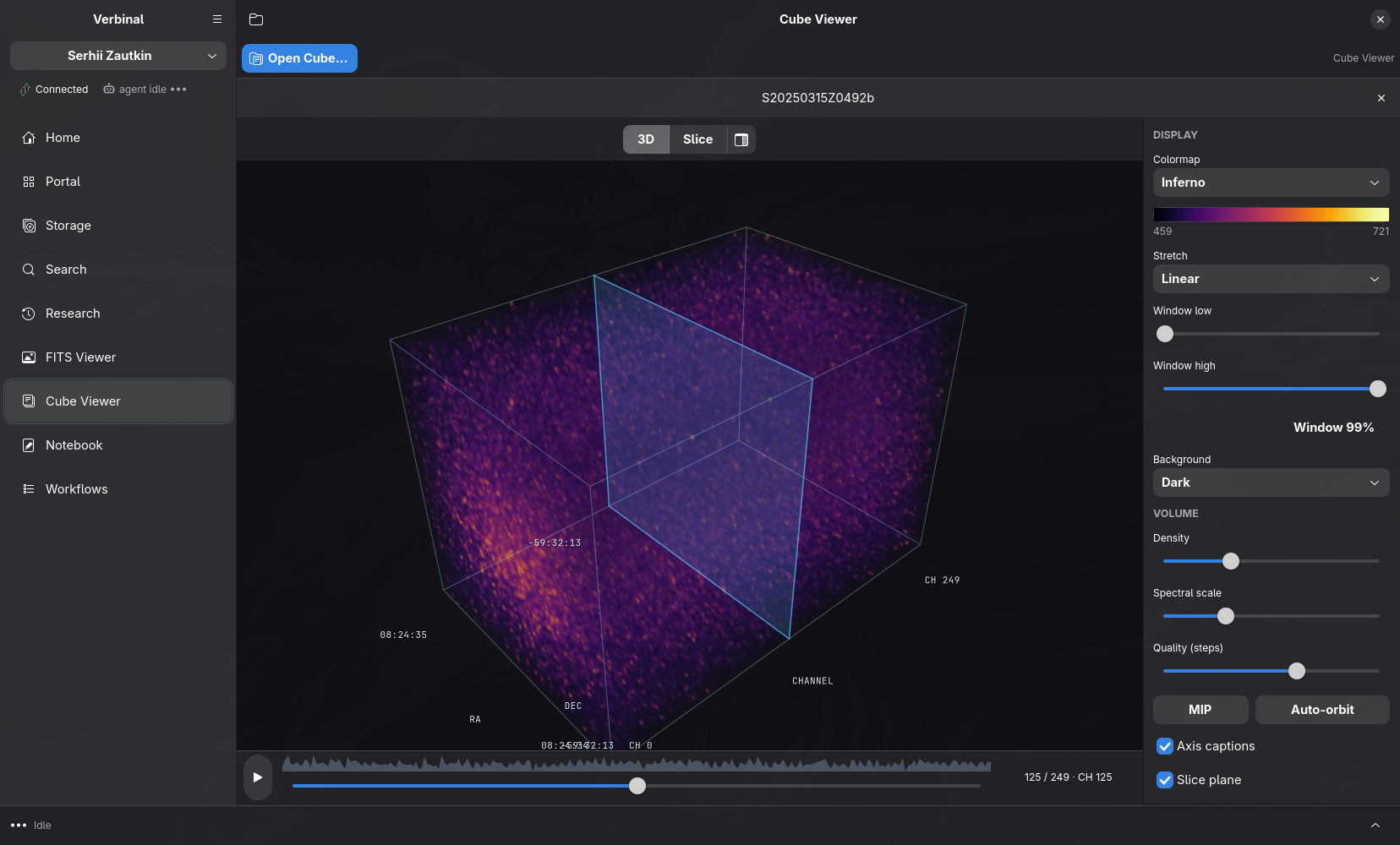
The dark theme is not a Verbinal setting. libadwaita asks the desktop, Omarchy answers dark, and the app follows — which is the whole argument for building natively rather than shipping a browser.
How it is built, and what that cost
The package is built on Arch, in CI, against the libraries pacman will resolve to — not cross-built on Ubuntu and hoped for. Two things about that were only learnable by running it.
makepkg enables LTO for every package by default. The ring crate compiles its own C and assembly, and under -flto those objects become LLVM bitcode that the Rust link step does not resolve. The build runs all the way through compilation and then dies with a page of undefined symbol: ring_core_*. Nothing about that symptom points at LTO. The fix is one line, options=('!lto'), and the reason it is now pinned by a test is that the failure gives you nothing to search for.
repo-add writes the database as a symlink. A GitHub release asset cannot be a symlink, so the publishing step has to copy the tarball under the name pacman asks for — and copying onto an existing symlink copies a file onto its own target, which fails. That one ended the release job after building and signing, before publishing anything.
Both were found by building and installing the package in a clean Arch container rather than by reading the recipe. The install path in this article is the one that gets exercised: the CI-built package is added to a repository, the key is fetched from this site, and pacman installs it with signatures required. It reports Validated By: SHA-256 Sum Signature, which is the sentence worth having.
Where things live
The repository is at verbinal.com/linux/arch/$arch, the signing key at verbinal.com/linux/arch/verbinal.gpg, and the packages themselves on GitHub Releases — the site redirects rather than proxying, so the bytes come from GitHub and nothing large is ever committed to the site.
Verbinal for Linux is free software under the GNU Affero General Public License v3.0. The PKGBUILD is in the app's own repository under packaging/arch/, beside the code it packages, so a dependency added to Cargo.toml and the dependency line in the package move in the same commit.
More about Omarchy itself: omarchy.org, the manual, and github.com/omacom/omarchy.
Get Verbinal on Omarchy
Free and open source under AGPL-3.0. A signed pacman repository, a free CANFAR account, and pacman -Syu from then on. Search and both viewers work without signing in — and your data stays on your machine.