1.4.0 was about what you do on one Mac: cutouts, marks, spectra, Remote Compute, and an assistant you allow session by session. 1.4.1 is about what lives longer than one Mac — notes you want on the laptop and the desktop alike, an observation's files that are too big to keep on either, the plots a batch job writes to your storage while the app is closed. It was planned in the open, in docs/plans/34-dev-1-4-1.md to 46-move-to.md in the repository, and tested as 1.4.0 was, by an AI assistant driving the app through its own tools.
Everything in it that touches your storage is off until you turn it on, and none of it goes anywhere but CANFAR.
Your work, in your own storage
Settings ▸ Storage ▸ Your Work in VOSpace has a switch for each part of your work: Research (each observation's details, notes, tags and quality — not its files), marks on images, sky bookmarks, workflows, saved queries, recent searches (the last 100), guides for assistants, Remote Compute history, batch job history, the images you added, recent launches and the Portal's launch defaults. Each is off until you turn it on, and a choice made here is made for every device you sign in on.
There is no Verbinal server in this. A manifest in your own storage, .verbinal/manifest.json, says which kinds of Verbinal's data you keep there and where, and every Verbinal you sign in to reads it. It syncs quietly right after you sign in, and it never deletes anything. Only accounts with CANFAR storage sync, and only while your .verbinal folder is private. Some things never leave this Mac at all: your sign-ins, what assistants may do, the session logs, and the files on this Mac themselves. A guide an assistant proposes reaches your other devices only once you apply it.
Some of it pays off on the first day. On a new Mac, the package lists of the CANFAR images you probed on another arrive from your storage once you sign in, and Image Discovery's rows turn to discovered as they come; Discover packages on an image probed elsewhere reads its list from storage, with no job, and a list from an older probe is marked, with Re-run discovery. A Remote Compute result that came in while Verbinal was not watching reaches its run. And marks and sky bookmarks are now kept with the file they are on — an archive file or a file in your storage, however it was opened — so every device that syncs them shows them on that file.
Results can go too. With Results turned on, each download, cutout, search export and figure Verbinal keeps on this Mac goes to Verbinal-Results in your storage as well, in the background, and waits while your storage cannot be reached. A search's Export has To Storage, which puts the file in Verbinal-Exports — a target list, already where a batch job can read it. Settings ▸ Storage shows each kind, its folder and what the last sync did, with Sync Now.
Kept by revision, never by a clock
Sync between devices is easy to get quietly wrong, and the usual way is to trust a clock: the newest timestamp wins, and the other edit is gone. Verbinal does not trust a clock. Each copy in your storage says which revision it is, which revision it was made from and which device wrote it, and no device's clock decides anything.
- Changes to different fields are both kept. A note's text changed on one Mac and its tags on another come out as one record with both.
- When two devices changed the same field differently, the version in your storage stays, and this Mac's waits in Settings ▸ Storage ▸ Conflicts, with Keep This Mac's and Keep the Other's. What you choose goes to every device.
- When one device removed what another changed, the change is kept and you are told, with Remove It if removing it was right.
An assistant reads the conflicts with list_sync_conflicts and proposes a choice with resolve_sync_conflict.
No device's clock decides. When two Macs changed the same thing, the version in your storage stays, and the other waits for you.
An observation's files, in Research
An observation is often more than its main file: a weight map, a calibration, a catalogue, a preview. In 1.4.1 the download button of a file in an observation's Files tab downloads it with Verbinal, with no browser, and Research keeps it with the observation, beside its main file, with buttons to open it, show it in the Finder and remove it. The trash asks first, and the observation and its notes stay. Research's detail lists the files, with where each one is.
Downloads go to a folder you can see and choose — Downloads, until you pick another in Settings ▸ General ▸ Downloads, or with Change… where you download — and never over another file. If the folder you chose is not there, they go to Downloads, and Verbinal says so. An observation's Download and Download Cutout no longer ask where to save, as an assistant's downloads never did; and deleting an observation deletes all its files, the main one and those downloaded one by one.
Move To… is for the file that should not live on your laptop. A laptop and a cloud beside each of Research's files say where it is: on this Mac, in your storage, or both. Move To… shows both places side by side, each file now and after, Copy or Move, your storage's free space, and a button that says what will happen. A move copies first, and removes the other copy only once the new one is there. A file's last copy is never removed, and a file of the same name in your storage is never written over. Remove Files… asks which files to take off this Mac, and says which have a copy in your storage.
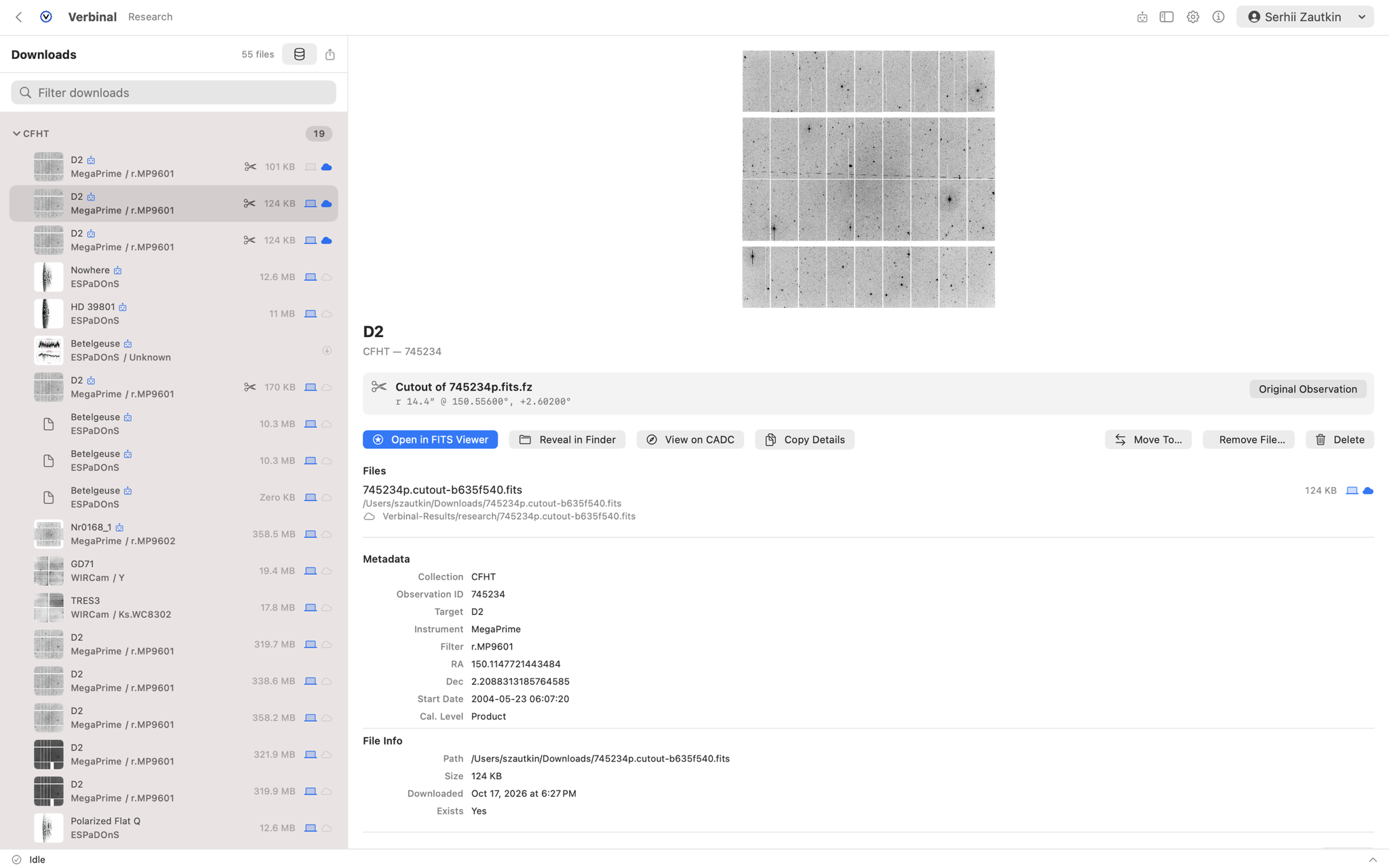
Verbinal-Results/research — with Move To… and Remove File… beside it.Assistants have the same, through show_move_to and move_research_files, with each file's places in list_downloaded_observations. And Research itself moves house only when you say so: the menu beside Research's count says where its records are kept, Move into the Database… backs the file up, checks every record and undoes it all on any mismatch, and Move Back to a File… returns them. No launch, and no assistant, moves them.
GPUs, and a Portal that refreshes in place
Platform Load has three rings now: CPU, RAM and GPU, the last Not reported until CANFAR reports its GPUs. The launch form's Standard tab has Use a GPU; Advanced, Headless and batch jobs have a GPUs count, through the counts CANFAR offers and greyed while it offers none; and Settings ▸ Portal has Use a GPU by default. Recent Launches shows a launch's GPUs. An assistant gets gpu from get_platform_load, and launch_session and launch_headless_job take GPUs and refuse a count CANFAR does not offer.
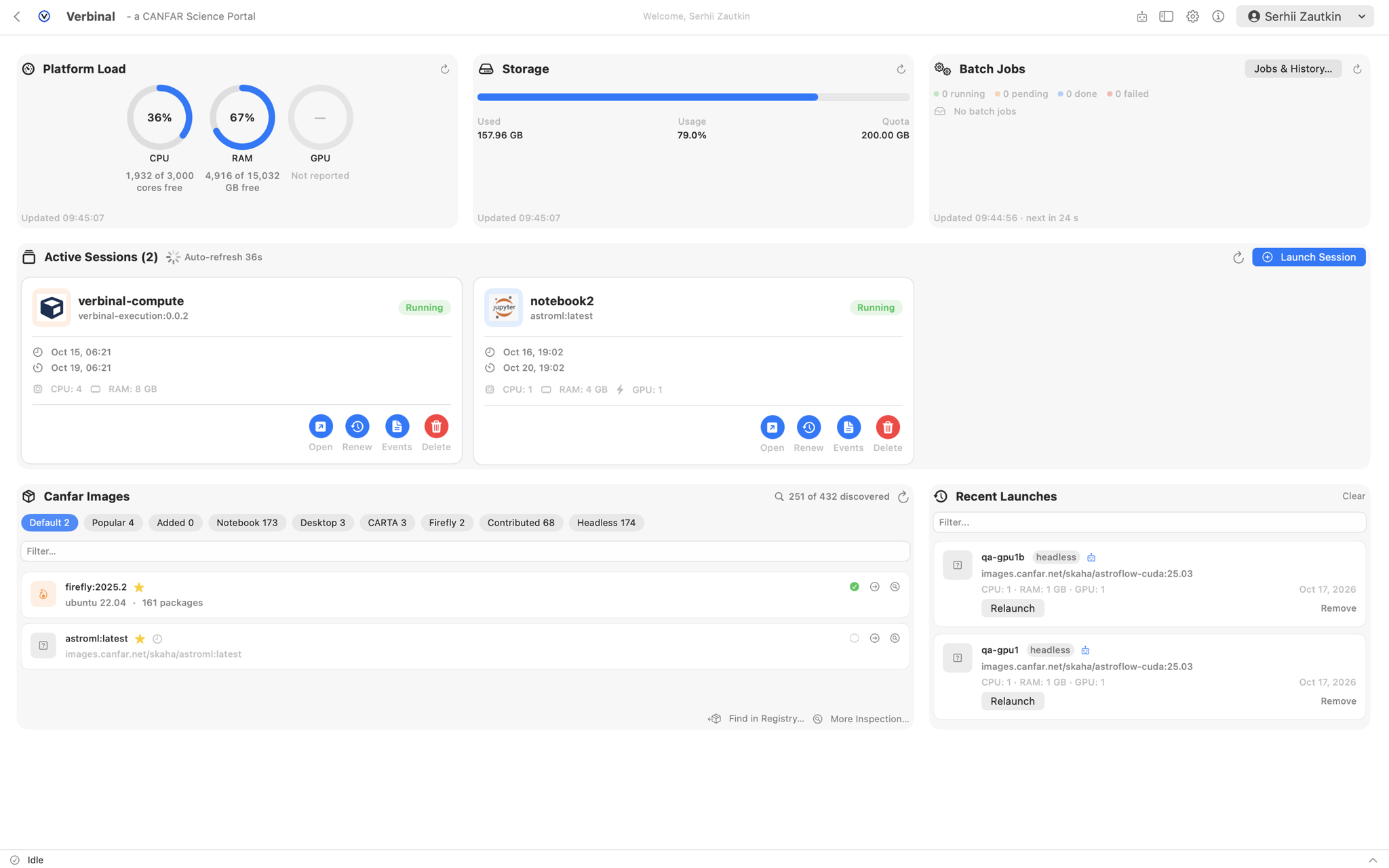
The Portal's cards refresh in place. Each has a reload button, Storage's too, keeps what it shows while it refreshes, and has a footer that says when it was updated, in 24-hour time. A card that cannot load says why, with Try Again, and keeps what it showed; a failed delete or renew says so the same way. The Canfar Images card has Reload like the others, and a later load now clears an old error, which used to stay. On reload, Storage's bar runs from empty up to your usage; with Reduce Motion it stays still.
Your assistant: a session that lasts
Since 1.4.0 you allow an assistant session by session. In 1.4.1 the session lasts: an assistant you allowed keeps it when Verbinal restarts — no new window, the same log — and a second start_session answers alreadyStarted: true. It ends after an hour without a call (you choose, from 15 minutes to a day, in Settings ▸ AI Agent ▸ Sessions), with End Session in Session Logs, or when you turn external AI agents off, and the assistant is told why.
How far, and Pause. The activity bar says how far a task has got, such as 120 of 288. Work that can wait, such as the storage sync, has Pause and Resume, says who paused it — you, your assistant or Verbinal — and stays paused after Verbinal quits. When your storage is slow or out of service, each request is asked again twice; a sync that still fails sits on the activity bar with why, and when Verbinal will try again — after 1, 2, 4… up to 30 minutes, and at once when the network comes back — with Retry. A sync that waits longer than ten seconds says Waiting for your CANFAR storage…. Assistants have the same controls: pause_activity, resume_activity, retry_activity, and the counts in list_activity.
Your assistant finds Verbinal while it is running. The relay an assistant's client starts finds the running app even when the address it was given is stale, and says whether Verbinal is not running or has gone; Verbinal keeps that address up to date, and a test run no longer overwrites it. read_vospace_file gives an image — PNG, JPEG or GIF up to 1 MB — as an image, so an assistant sees the plots its jobs write. And many answers are put right, from three test passes: search_observations gives the ADQL that ran, with its TOP; a write that waits answers pending: true and what it waits for; get_headless_job finds a finished job in the job history; and columns answer to ra(j2000) and dec(j2000).
Two new workflow templates put it to use. A survey on CANFAR: from a query to candidates selects the data with ADQL, processes every target in batch jobs next to the data, and keeps the candidates with the evidence for each. Set up the assistant for discovery work does what its name says.
Sign-in, the viewers, and the rest
- An expired sign-in renews itself, and the request goes through. When your CADC session expired, Verbinal signed you in again with the stored password, but the request that found it out failed anyway. It now waits for the new session and is retried, and many requests at once sign in once. Without a stored password only that request fails, and the sign-in sheet says why it opened: Your CADC session ended. Sign in to continue.
- Sign In, or your account, on every screen. The toolbar's account control was only on Home and in Portal.
- Select Area in the FITS Viewer. Turn on Select Area, beside Export Figure…, or hold ⌘, and drag a box on the image: Export Figure opens on that area. An assistant can turn it on for you with
set_fits_view. - The FITS Viewer fits its window with no file open. Its empty tab took more height than the window had, pushing the toolbar, the tabs and the activity bar out of sight, and showed image controls beside no image. It now shows how to open a file and the recent ones, and the controls come once a file is open. Its side panel fits its width, too: the five stretches become a menu when they do not fit.
- A new colour map or stretch is drawn at once, without the sliders' wait, with Rendering… in the image's corner while it takes long enough to notice.
- Every load says how it went, the same way — loading, shown, or why not, with Try Again where trying again can help: the storage browser, the data train, an observation's detail, probe-job logs, the file browser and the launch form's choices.
- Side panels fit their narrowest pane, and Workflows and Research keep to Verbinal's toolbar, with none of their own over the screen.
What was wrong
Most of the fixes in 1.4.1 are rough edges. A few gave a wrong result, and those are worth saying plainly:
- A change from another device during a sync was lost. The sync took it as seen and never brought it in. A change made while a sync runs now goes when it ends; storage is read as it is now, not from a cache, so each change is written once; and two quick choices in Settings ▸ Storage no longer undo each other.
- The Standard tab launched the wrong image. After a launch with a custom image on Advanced, Standard launched that image instead of its own.
- Recent Launches could disagree with itself. There were three copies of it, over one file. There is one list now, the same everywhere.
- A cube that failed to open showed the previous cube. It now says why it did not open, as every load does.
- A warning was cleared as soon as it was set. When the assistant server could not write its address, the warning that said so disappeared at once. It is shown now.
- Remote Compute's folders failed to be made, over and over. It now makes them in your storage once, after asking, with no failed writes in the log.
Privacy, source, and how to get it
The privacy posture has not moved, and the sync is built to keep it. No analytics, no telemetry, no third-party services; your credentials stay in the macOS Keychain, and traffic goes directly to CANFAR and CADC over HTTPS. What 1.4.1 syncs goes to your own CANFAR storage — there is no server of Verbinal's to send it to — only for the parts you turn on, and only while the folder that holds it is private. Your sign-ins, what assistants may do, and the session logs never leave this Mac.
Verbinal for macOS is free and open source under the Mozilla Public License 2.0, with the full source and changelog at github.com/szautkin/canfar-macos. It runs on macOS 14 (Sonoma) or newer, in English and French, and its manual, in both, is at docs.verbinal.com. Search and both viewers work without signing in; Portal, Remote Compute, Storage and the sync need a free CADC account. It is on the Mac App Store, and the release page on GitHub has an unsigned .dmg and .zip, built by CI; check a download with shasum -a 256 -c checksums-sha256.txt.
Get Verbinal for macOS 1.4.1
Free and open source under MPL-2.0. macOS 14 or later and a free CANFAR account. Search and the viewers work without signing in — and what you sync goes only to your own storage.