Verbinal has been a native companion for the CANFAR Science Portal and the Canadian Astronomy Data Centre (CADC) across macOS, iOS, Windows, and Android. The Linux app is the member of the family that has never had a page of its own here — which has become conspicuous, because it is no longer the modest session manager it started as.
It is written in Rust, with a GTK 4 and libadwaita interface, a Tokio runtime bridged to the GLib main loop, and no Electron anywhere near it. It is not a port wearing another platform's clothes: it looks and behaves like a GNOME application because it is one. It installs from a .deb, it is free software under the GNU Affero General Public License v3.0, and its interface ships in English and French.
Version 1.3.3 brought it to parity with the Windows app's Workflows-and-AI generation. The four releases since — 1.3.4 through 1.3.7, all inside three days — were something less glamorous and more useful: six QA sessions driving the app against the live service, and the fixes that came out of them. Both halves of that story are below.
A protocol you can tick off. An agent that can run it, and has to ask before it breaks anything. A cube you can turn in 3D. One GTK window, and your data never leaves it.
What Verbinal for Linux is
If it is new to you: Verbinal for Linux is a desktop client for CANFAR and the CADC that needs GTK 4.12+, libadwaita 1.4+, and a Secret Service provider — GNOME Keyring, KDE Wallet, or an equivalent — where your CADC token lives instead of in a config file. Install the .deb from GitHub Releases with sudo dpkg -i verbinal_*_amd64.deb, or build it from source with cargo build --release.
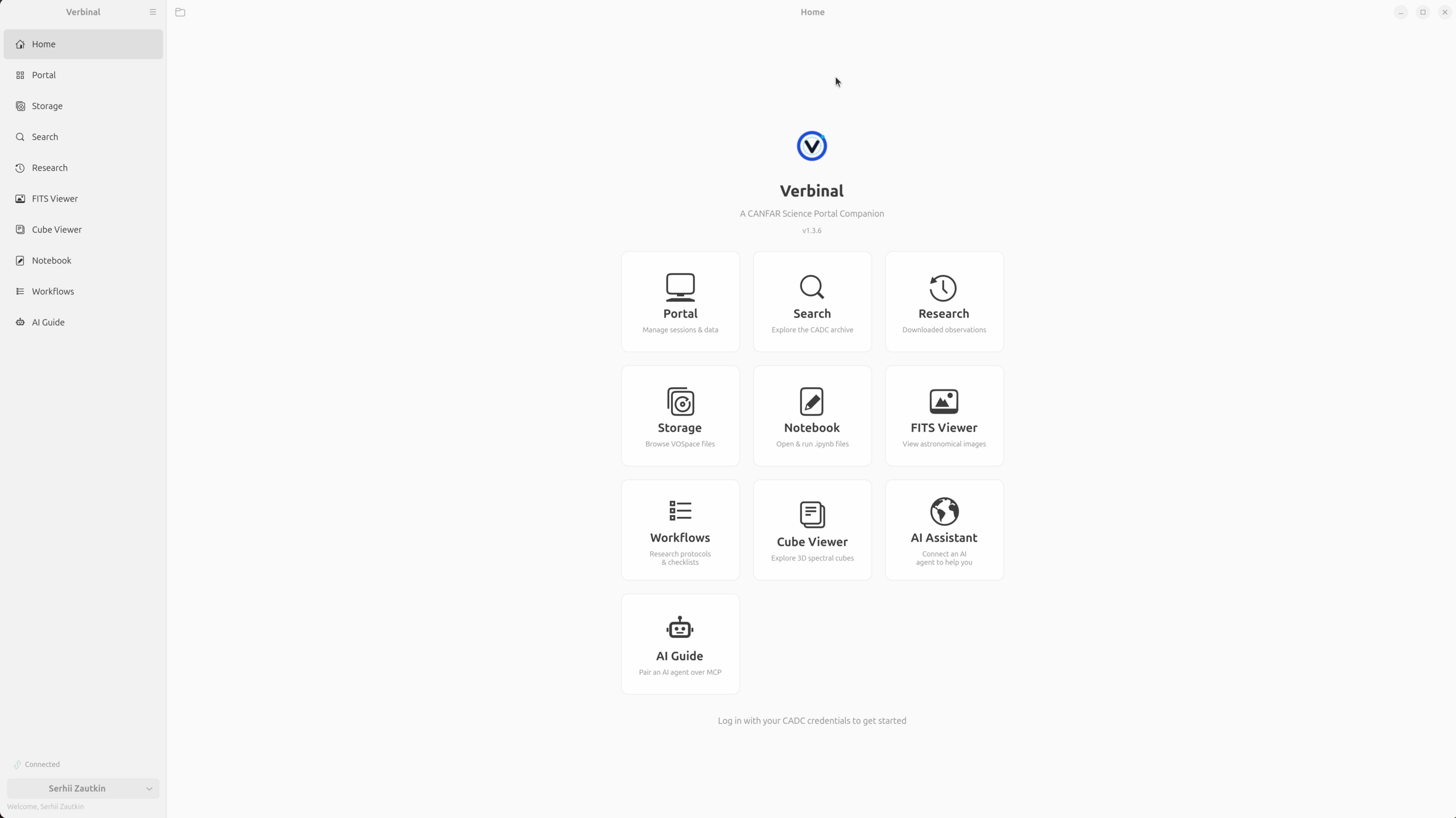
The app is a set of modules, each a tile on the Welcome screen: Portal for sessions and batch compute, Search for the CADC archive, Research for what you have downloaded, Storage for VOSpace, a 2D FITS Viewer, a 3D Cube Viewer, a native Notebook, Workflows, and the optional AI Assistant and AI Guide. Portal, Storage, and compute need a free CADC account; Search and both viewers work without signing in, so you can pull a public file and inspect it before you ever log in. There is no telemetry anywhere in the app.
Portal: sessions, batch jobs, and what is inside a container
Portal is the CANFAR control room. Launch and manage interactive Skaha sessions — Notebook, Desktop, CARTA, Firefly, Contributed — from a Standard form, an Advanced one that takes a custom registry image with credentials, or a Headless tab for work that does not need a screen. Around the edges sit the numbers you plan around: your VOSpace quota, a Recent Launches list for one-click re-launch, and a Platform Load panel with live cluster CPU and RAM availability.
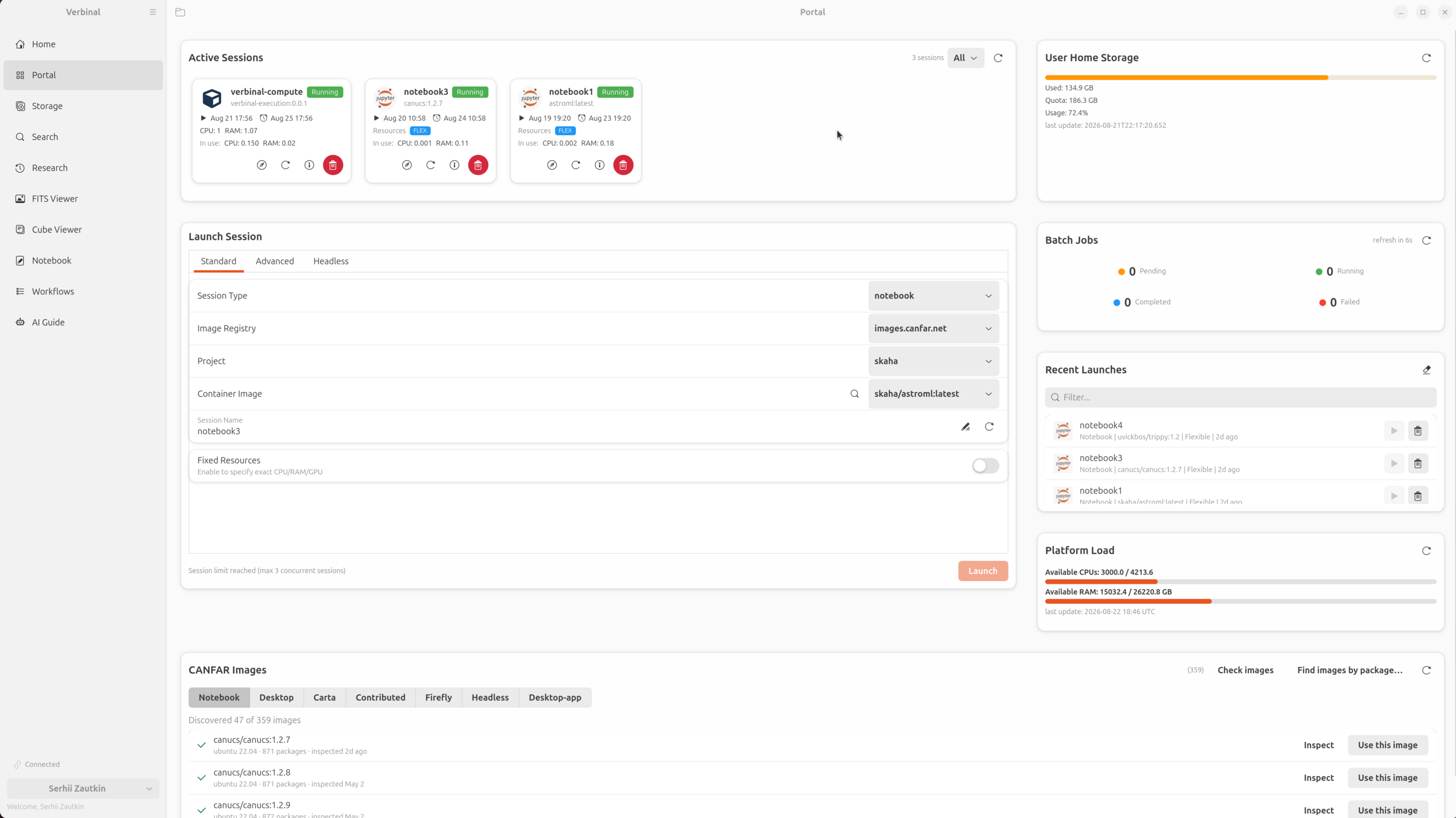
Headless batch jobs run with replicas that are actually replicas: one launch per replica, each named job-N and told which one it is through REPLICA_ID and REPLICA_COUNT. Because CANFAR reaps finished jobs within seconds, Verbinal remembers the last fifty along with the reason each failure failed — captured from the job's logs and events while the job still exists, since those die with it.
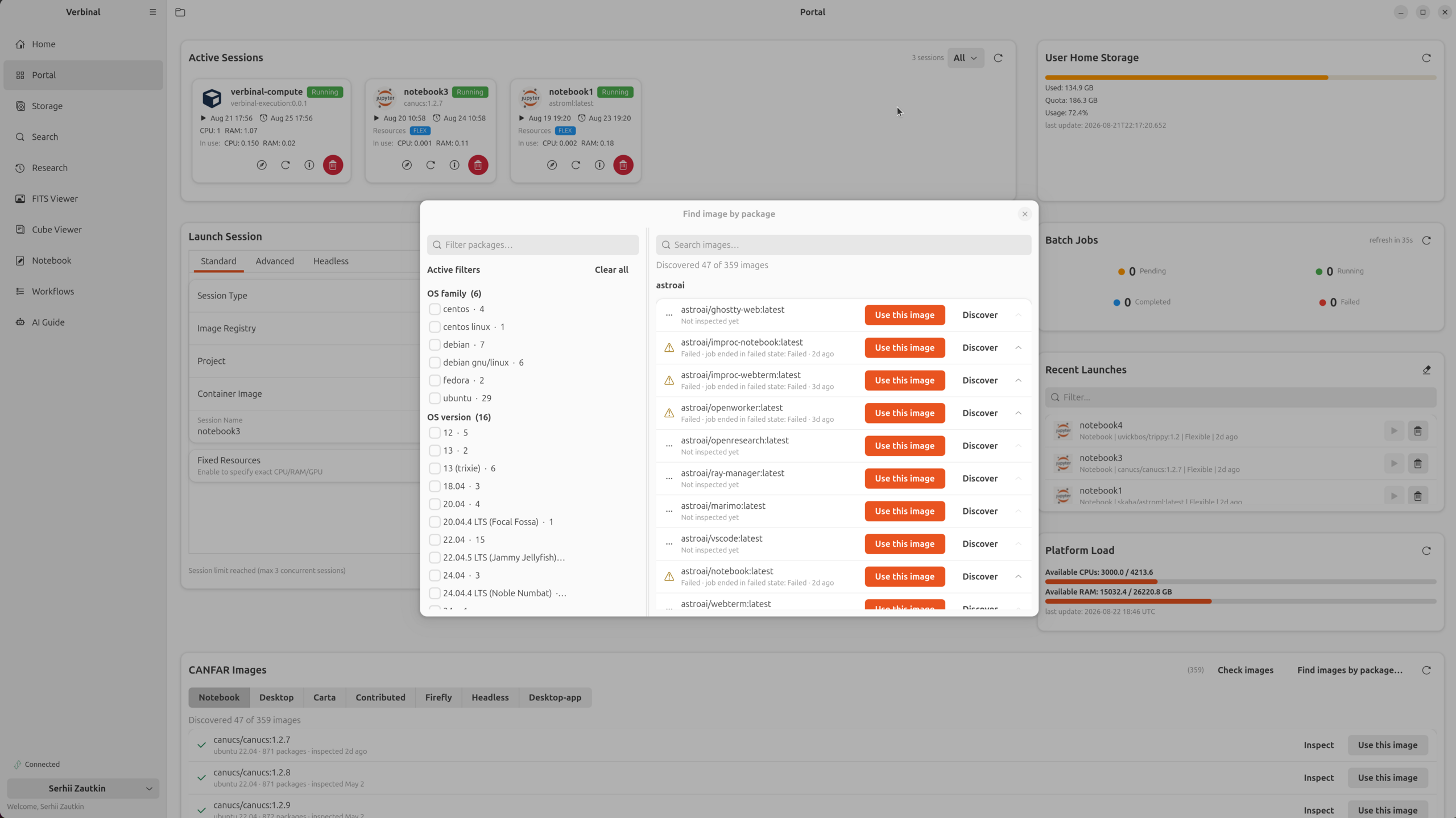
The catalogue at the bottom is more interesting than it looks. Image Discovery answers a question you would otherwise answer by launching a session and poking around: which of these 359 container images has the package I need? It inspects images with a small headless probe, publishes the manifest to your own VOSpace so a second machine or a reinstall costs no jobs, and lets you facet the catalogue by OS family, version, and the packages inside.
Find it, keep it, store it: Search, Research, Storage
Most projects begin at the archive, and Search queries the CADC directly over TAP — CFHT, JCMT, DAO, Gemini, HST, JWST, MOST, and more. Do a cone search by coordinate or resolved target name, or write ADQL yourself in the editor tab. Narrow the results with live column filters that understand boolean expressions — !tess & !apass means what you would expect — preview a row without leaving the grid, save the queries you will run again, run a VizieR catalogue cone search alongside, and export to CSV or TSV.
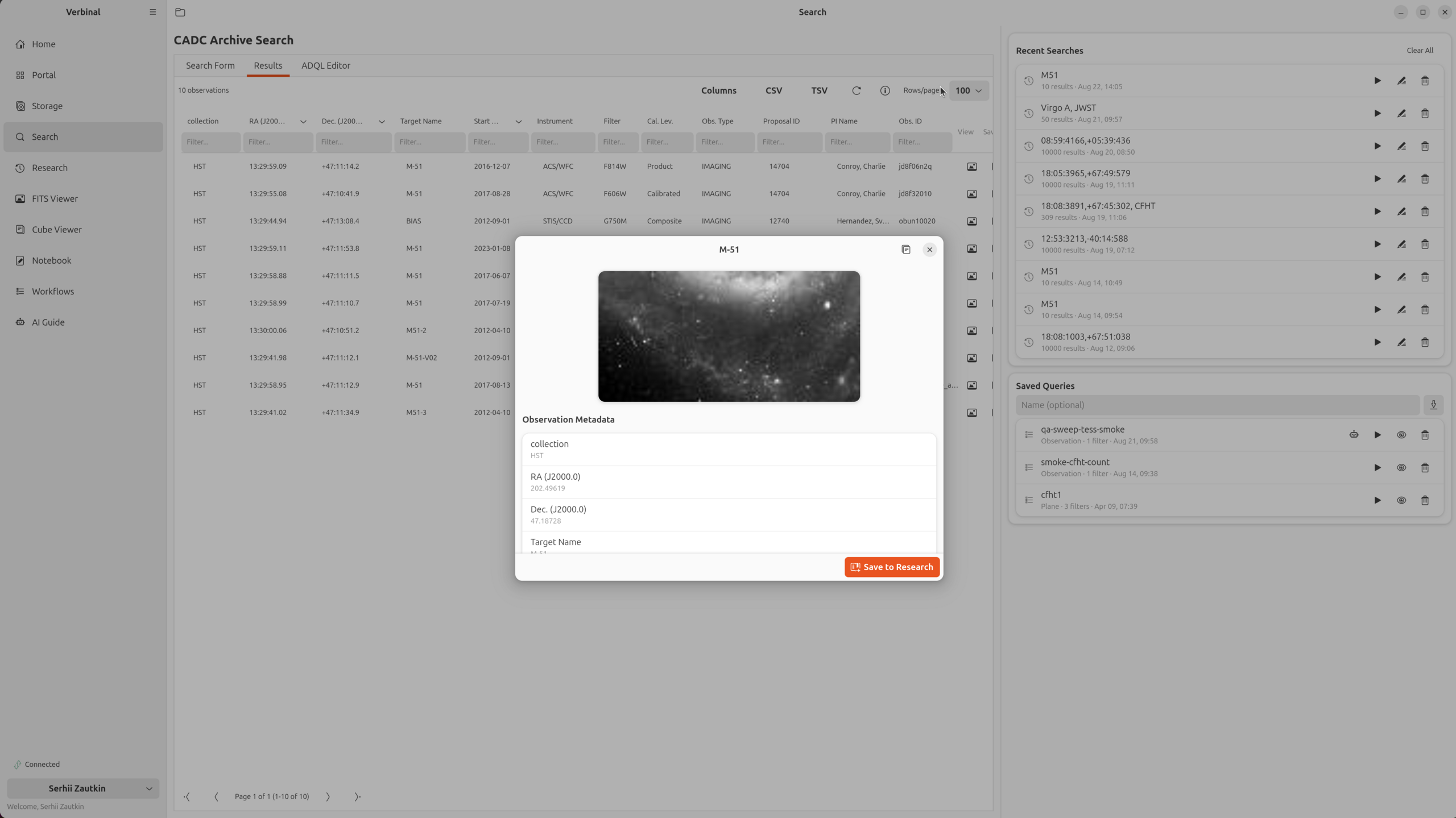
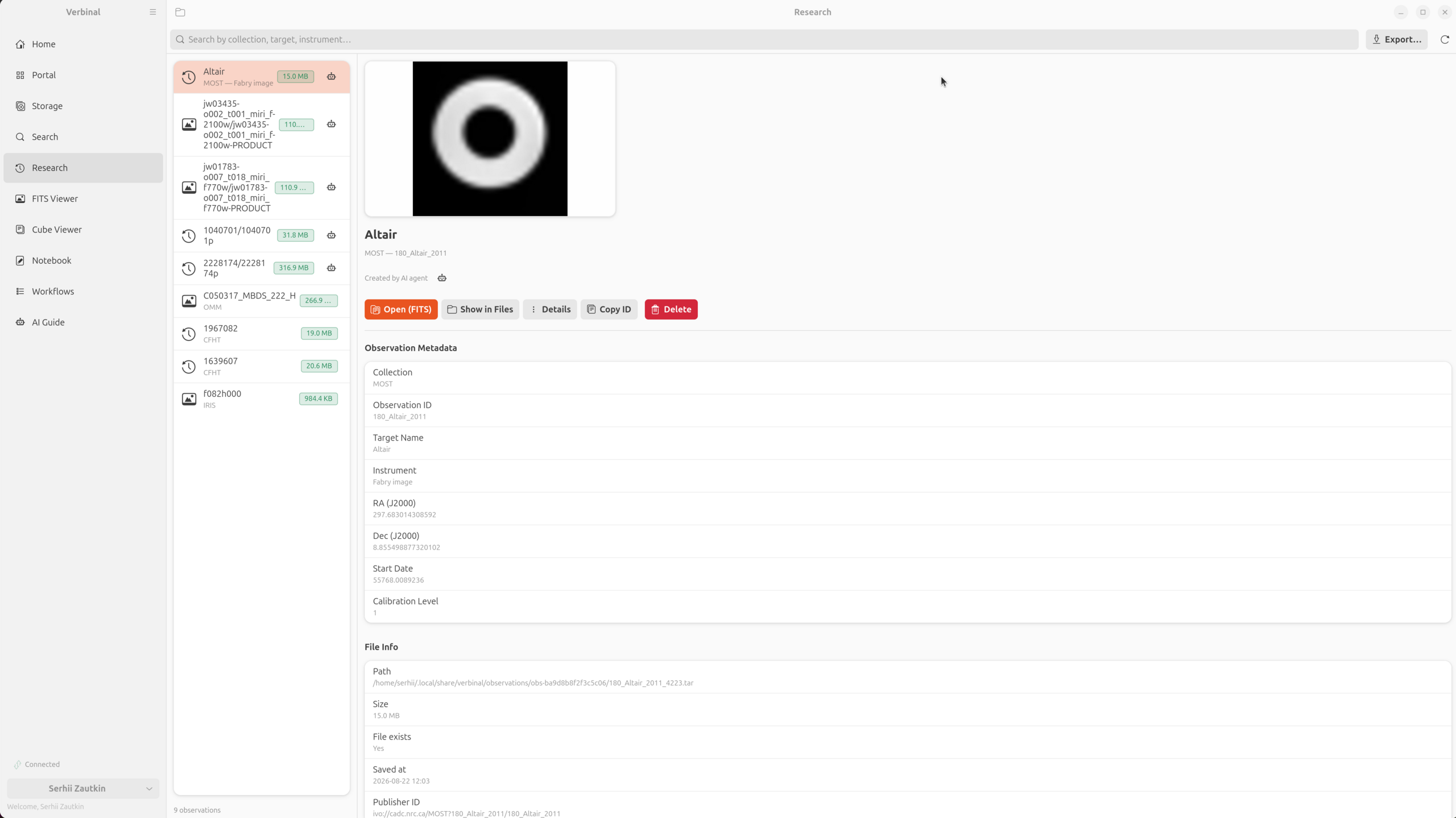
What you keep lands in Research, a local library organised by observation, with previews, per-observation notes, and an exportable research bundle. The bundle can now carry the data files themselves, streamed through a ZIP64-capable writer so a multi-gigabyte cube is fine, and it includes the citation fields — proposal id, PI, title, data release — that its own README tells you to cite.
Storage is a full VOSpace/ARC browser — upload, download, organise, share a folder with a group or make it public, all with quota tracking. Transfers stream, with a progress strip and a cancel button; a download lands in .tmp and is renamed only once it is complete, so a failed transfer never leaves a truncated FITS file that looks whole.
Workflows: research protocols you can tick off
A great deal of astronomy is procedure — the ordered set of steps that turns a question into a measurement — and that procedure usually lives in someone's head, a lab wiki, or a stale README. Workflows makes it a first-class object: a protocol written as a plain markdown checklist, rendered as numbered step cards you check off as you go, with the check-off written back byte-preservingly so the file stays yours.
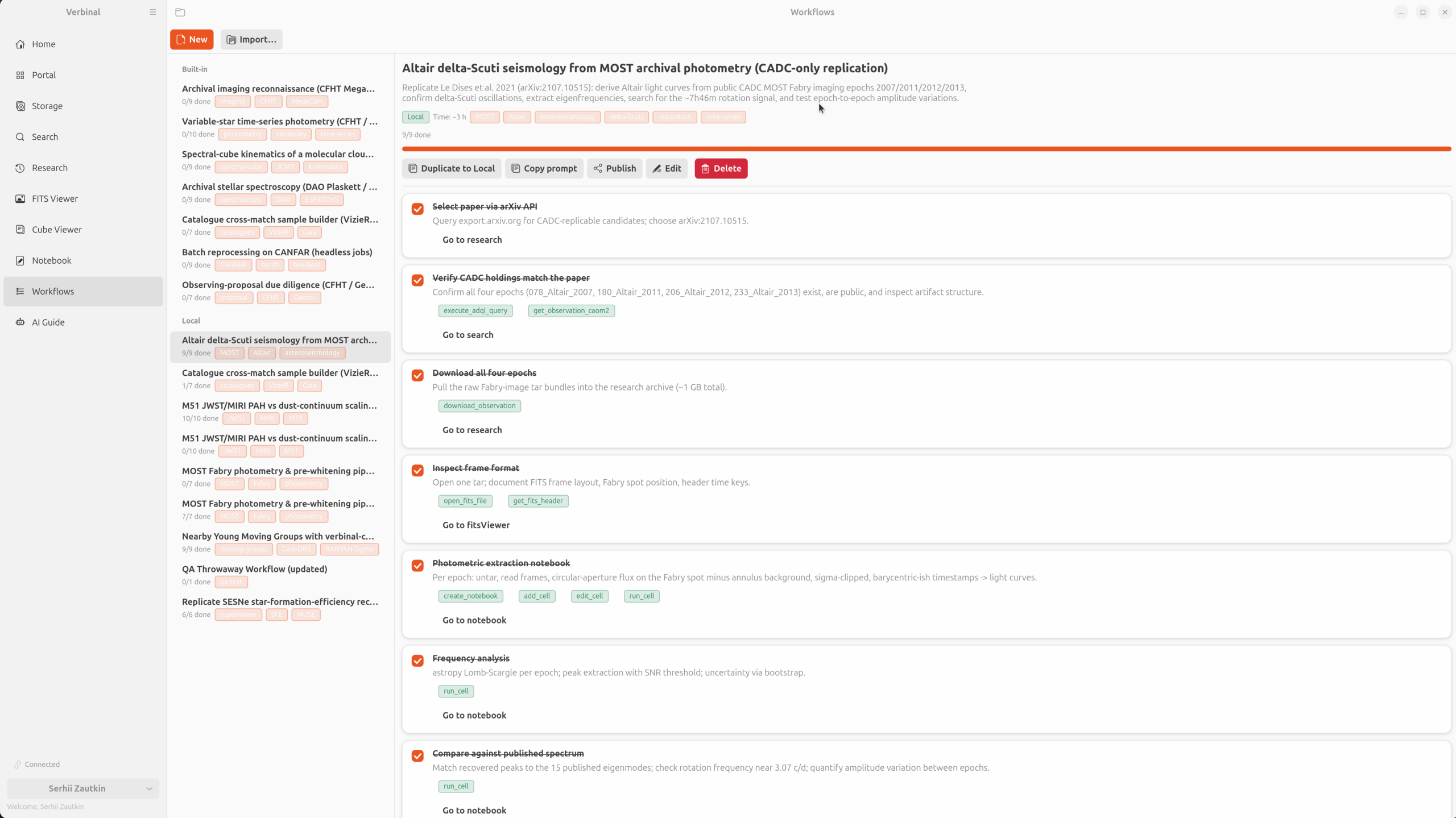
execute_adql_query, download_observation, run_cell — and links into the module that does the work.What makes it more than a to-do list is that the steps are wired into the app. Each card names the concrete action it stands for and links straight to the module that carries it out, so download all four epochs is one click from actually downloading them in Research. Verbinal ships seven built-in, Canada-first templates — archival imaging reconnaissance on CFHT MegaCam, stellar spectroscopy on DAO Plaskett and CFHT ESPaDOnS, batch reprocessing as headless jobs, a VizieR cross-match sample builder, observing-proposal due diligence, spectral-cube kinematics, and variable-star time-series photometry — and you can write your own in markdown with a live-preview editor. Keep a workflow local, or publish it to your team over VOSpace. And because a protocol is also a plan an agent can execute, every workflow has a Copy prompt button.
An AI assistant that can drive the app — and has to ask
Verbinal for Linux can pair with your own Claude Desktop, Claude Code, or any MCP client. A verbinal mcp bridge speaks the Model Context Protocol over a private per-user UNIX socket, and a guided connect wizard writes the client config and runs a self-test. The agent gets the same app you use: search and download, both viewers, the notebook, storage, sessions, and Workflows it can follow or author.
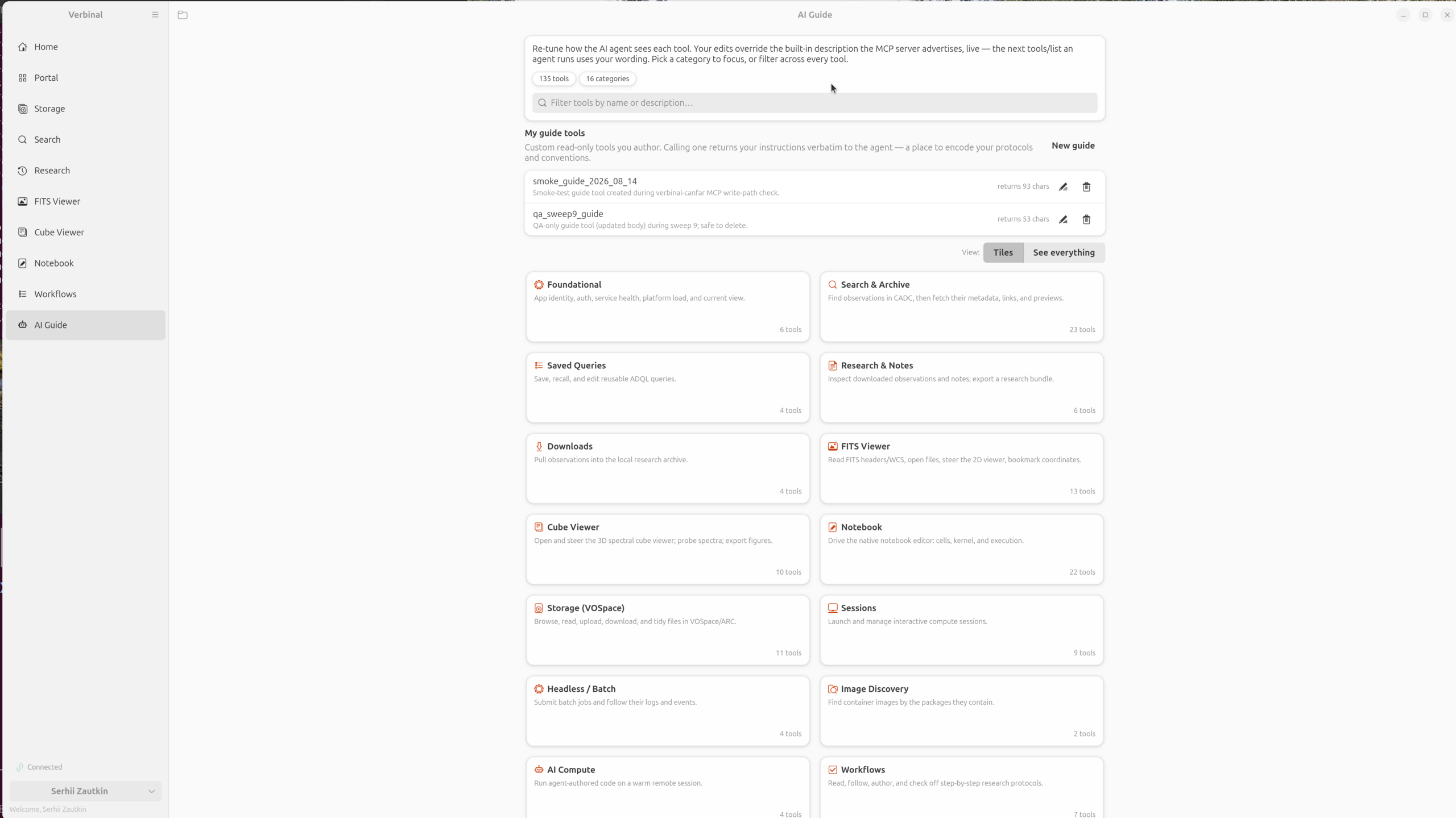
The reason this is comfortable rather than alarming is the control model. Read-only calls apply straight away; anything consequential queues as a proposal a human approves in the app, and destructive operations always do. Every action lands in an event log, and anything an agent created carries a robot badge so you can see whose work it was — the Altair observation two figures up is marked exactly that way. The AI Guide lets you rewrite how each of the 135 tools describes itself, live, so you can widen or narrow what the agent reaches for. It is an assistant with its hands visible, not an autopilot.
Two viewers: FITS in 2D, cubes in 3D
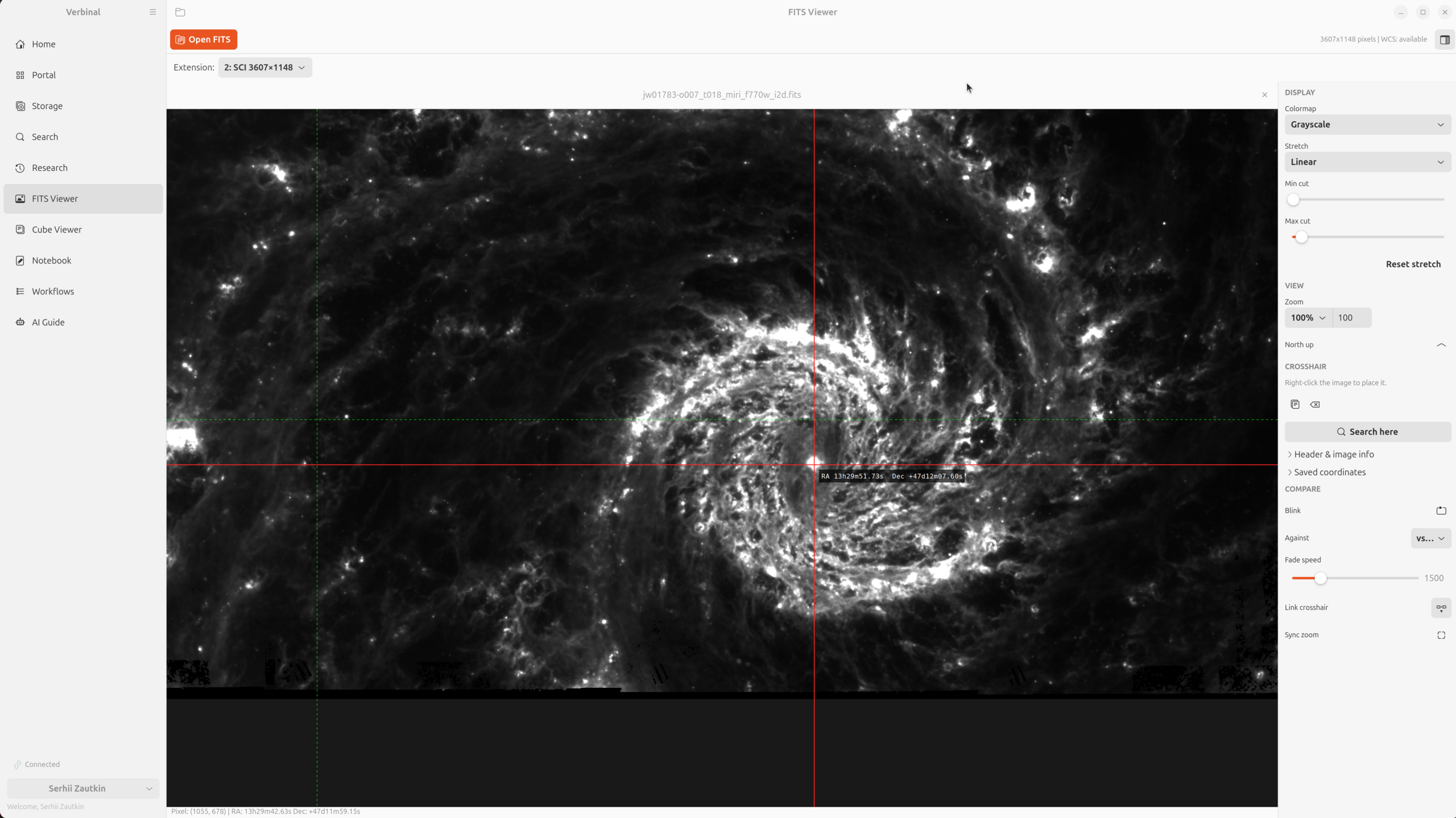
Data you can see is data you can trust, and Verbinal brings its own viewers rather than sending you to a browser. The FITS Viewer is a 2D image viewer with projection-aware WCS including SIP distortion (TAN, SIN, STG, ZEA), a coordinate readout and go-to, pixel probing, saved coordinates, multiple stretches and colormaps, a North-up rotation taken from the WCS, and an extension picker for multi-HDU files. Search here turns the crosshair into an archive query. Open several files at once and compare them: a linked crosshair that follows the same sky position across tabs, synchronised zoom across different pixel scales, and a blink mode with an adjustable fade.
The Cube Viewer is the same idea in three dimensions. In 3D mode it is a real volume renderer — a GLSL ray-marcher on a GtkGLArea — and you fly around position–position–velocity space: orbit, zoom, auto-orbit, switch to a maximum-intensity projection, and shape the transfer function with density, spectral scale, and an editable opacity curve until the noise floor drops away and the structure stands out. A Slice mode reads a single channel with WCS coordinates and a spectral value, and click-to-probe pulls the full spectrum through the cube at any pixel. Along the bottom, a channel scrubber with an intensity waveform shows the spectral structure of the whole cube at a glance and plays through it. Export figure composes a publication plate as PNG or PDF rather than taking a screenshot.
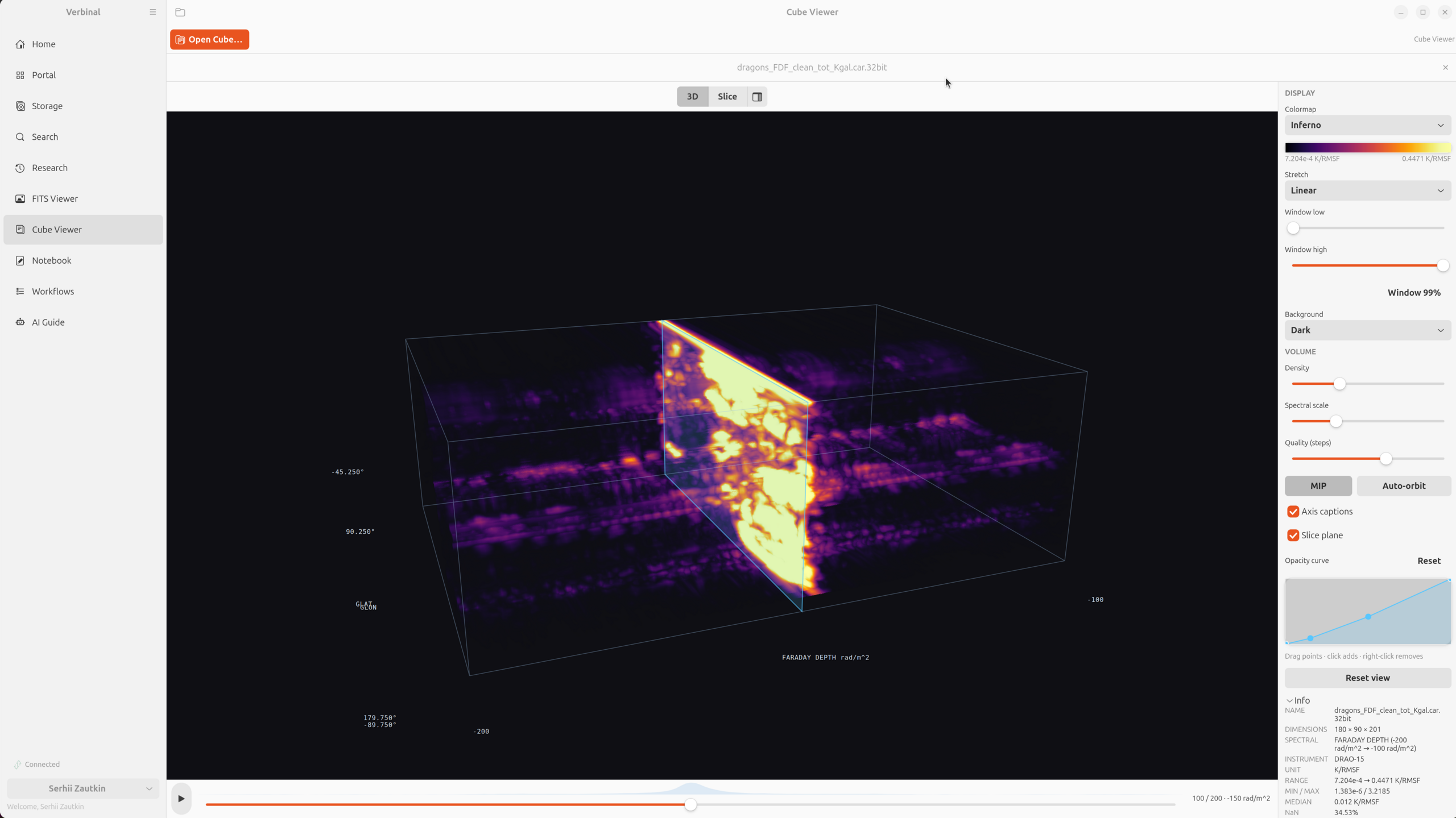
One detail here is specific to Linux and worth stating rather than hiding: GPU drivers vary a great deal more on Linux than on a Mac or a well-behaved Windows box, so the Slice mode is entirely GL-free and always available. If the volume renderer cannot start on your machine, you still get the channel scrubber, the spectrum probe, the WCS readout, and figure export — the measuring instruments — rather than an error dialog and nothing.
Notebook: a local kernel, and a remote one when you want it
Some analysis wants code, and Verbinal runs it in place. The Notebook module edits and executes .ipynb files natively against a local Python kernel — your system python3, no browser, no server to start, no JupyterLab tab to babysit. Open several notebooks in tabs, run a cell or the whole book, see matplotlib figures render inline. From a downloaded observation in Research you can seed a ready-to-run analysis notebook, so a Workflow step like photometric extraction lands you in a real, populated notebook rather than a blank cell. Missing packages can be installed from the notebook — carefully, because on Ubuntu the system Python is externally managed and pip install --user is refused by design; Verbinal offers to override that only after pip itself says so, and only if you ask.
There is a second kind of compute, and knowing which one you are using matters. Notebook kernels run locally, on your machine, with whatever you have installed. run_code — the tool an agent reaches for — runs remotely on a warm CANFAR container: Python 3.11 with astropy, numpy, matplotlib and pyvo, your /arc/home mounted, and your CADC certificate available for authenticated archive fetches from inside the job. Local for anything touching your own files; remote for anything that wants the platform's data and packages.
Built the Linux way — and how it differs from the Mac and Windows
Because Verbinal is written natively on each platform, the Linux app is not the Mac or Windows app recompiled. A few differences are worth naming outright:
- Toolkit. Rust with GTK 4 and libadwaita, where macOS is SwiftUI and Windows is WinUI 3. It follows your GNOME theme and adaptive layout rather than approximating a system it is not running on.
- 3D rendering. The Cube Viewer is an OpenGL (GLSL 330) ray-marcher in a
GtkGLArea, with a GL-free Slice mode as a guaranteed fallback; macOS uses Metal and Windows uses Direct3D, neither of which needs that fallback. - Credentials. Tokens live in the system keyring through the Secret Service API — GNOME Keyring, KDE Wallet, or another provider. On macOS that is the Keychain; on Windows, the Credential Manager.
- Distribution. A
.debfrom GitHub Releases, orcargo build --releasefrom source. There is no store gatekeeper between you and the app, and no sandbox restricting which of your files it can read. - Licence. AGPL-3.0, the same as the Windows client; the Mac app is MPL-2.0.
- Requirements. GTK 4.12+, libadwaita 1.4+, a Secret Service provider, and Python 3 if you want to run notebooks locally.
What five releases in nine days actually changed
1.3.3 landed the features. Then six QA sessions drove the app against the live CADC and CANFAR services — including two end-to-end replications of published papers, run entirely on-platform — and 1.3.4 through 1.3.7 fixed what that turned up. It is worth being specific, because the pattern is instructive: almost none of it was visible from inside the code.
- A filter that had never worked. The search form's Public data only option built ADQL with
GETDATE(), which is T-SQL; CADC answers "Function [GETDATE] is not found in TapSchema". It had never worked here or in the Windows app it was ported from. CADC declares ADQL 2.0 with twelve geometry functions and no UDFs, and a guard now refuses any call outside that set — which is what would have caught it on day one. - Transfers ran blind. Storage held whole files in memory, so a 5 GB cube needed 5 GB of RAM, showed nothing until it finished, and could not be stopped.
- A download that produced nothing counted as a success. One CADC endpoint answers HTTP 200 with an empty body for a publisher id it cannot resolve, so a zero-byte file landed in the library reported as "Downloaded … (0 bytes)". Zero bytes is refused now.
- Every record in the library was anonymous. Target, instrument, filter and coordinates were only ever filled in by saving a search result, so anything fetched by publisher id arrived with a file and nothing else. A download now asks the archive — one indexed query, a quarter of a second.
- Three services reported a 4xx beside a green tick. The label was not the fault; the probe was. It sent a bare
GETto endpoints that answer 400 or 401 to exactly that, then called the host healthy because it had replied. Every IVOA service publishes/availabilityfor this question, and the probe reads that document now — so a service announcing planned downtime is reported as down, in its own words. - An agent could not connect, and nothing said why. One tool advertised a malformed schema; clients that validate before registering rejected the whole list, which presents as "this server has no tools" rather than "one tool is malformed". Every advertised schema is checked now.
- An agent's work was recorded as yours. Nothing an agent created ever earned its badge, because the router applied a copy of the record taken before the badge was stamped.
- Pending proposals did not survive a restart. Seven awaiting review vanished in silence, and one already approved was voided. The queue is journalled and rehydrated now.
- 89 suppressed dead-code warnings hid five real defects — features written and never wired up. The shipping build lints with
dead_codeon.
The test suite went from 841 to over 1,200, and the additions are the interesting part: invariant tests that walk the live tool manifest checking that every advertised argument is read by something and everything settable is readable, and tests that walk the source for strings a person reads — nothing reaches a label or a toast without the catalogue, and every localized string has a French form. That last one matters, because at 1.3.3 the French was only ever the part the reference had: 621 user-visible strings were reaching people in English, including whole screens. All of them are translated.
Privacy, source, and how to get it
The privacy posture is the same one every Verbinal app keeps. No data collection, no analytics, no crash reporting, no third-party services — the app has no backend of its own. Your CADC credentials stay in the system keyring, and network traffic goes directly to CANFAR and CADC over HTTPS with nothing in between. Data you open in the viewers is read and rendered on your own machine; the cube you turn in 3D is never uploaded.
Verbinal for Linux is free and open source under the GNU Affero General Public License v3.0, with the full source at github.com/szautkin/CanfarDesktopUbuntu — the FITS parser, the WCS handling, the volume shader, and the MCP tool layer described here are all things you can read rather than take on faith. Install the .deb, open a tile, and — if you like — start from a Workflow template and let it walk you from the archive to a figure without leaving the desktop.
Get Verbinal for Linux
Free and open source under AGPL-3.0. GTK 4.12+, libadwaita 1.4+, and a free CANFAR account. Search and both viewers work without signing in — and your data stays on your machine.