Verbinal has been a native companion for the CANFAR Science Portal and the Canadian Astronomy Data Centre (CADC) on macOS, iOS, Linux, and Android for a while now. With 1.3.0 it arrives on Windows as a first-class member of the family — not a port wearing another platform's clothes, but a genuinely native desktop app built with C#, WinUI 3, and the Windows App SDK, with the Fluent look, a Mica backdrop, and the keyboard-friendliness Windows users expect.
It arrives with ambition, too. Where the macOS releases have grown feature by feature, the Windows app lands as what its changelog calls the first release of the Workflows / AI-assistant generation: it brings the everyday work of an astronomer — finding archival data, inspecting images and cubes, running analysis, managing cloud storage and compute — into one window, and adds two things worth pausing on. Workflows turn a research protocol into a checklist you step through, each step wired to the exact part of the app that does the work. And an optional AI assistant can drive that same app for you, under a control model that keeps you in charge of every consequential move.
This piece is a tour of what the Windows app is, what 1.3.0 puts in it, and — because it is built the Windows way — where it differs from the Mac. If you already know Verbinal on another platform, skim to the parts that are new; if this is your first Verbinal, start here.
A protocol you can check off. An agent that can run it. A cube you can turn in 3D. One native Windows window, and your data never leaves it.
What Verbinal for Windows is
If you are new to it: Verbinal for Windows is a native desktop client for CANFAR and the CADC, written in C# 12 / .NET 8 with a WinUI 3 interface on the Windows App SDK. It runs on Windows 10 (1809) or newer, installs from the Microsoft Store as a packaged MSIX app, and is free and open source under the GNU Affero General Public License v3.0. The interface is available in English and French (Settings → General → Language), and your CADC credentials live in the Windows Credential Manager (PasswordVault) — never in a config file.
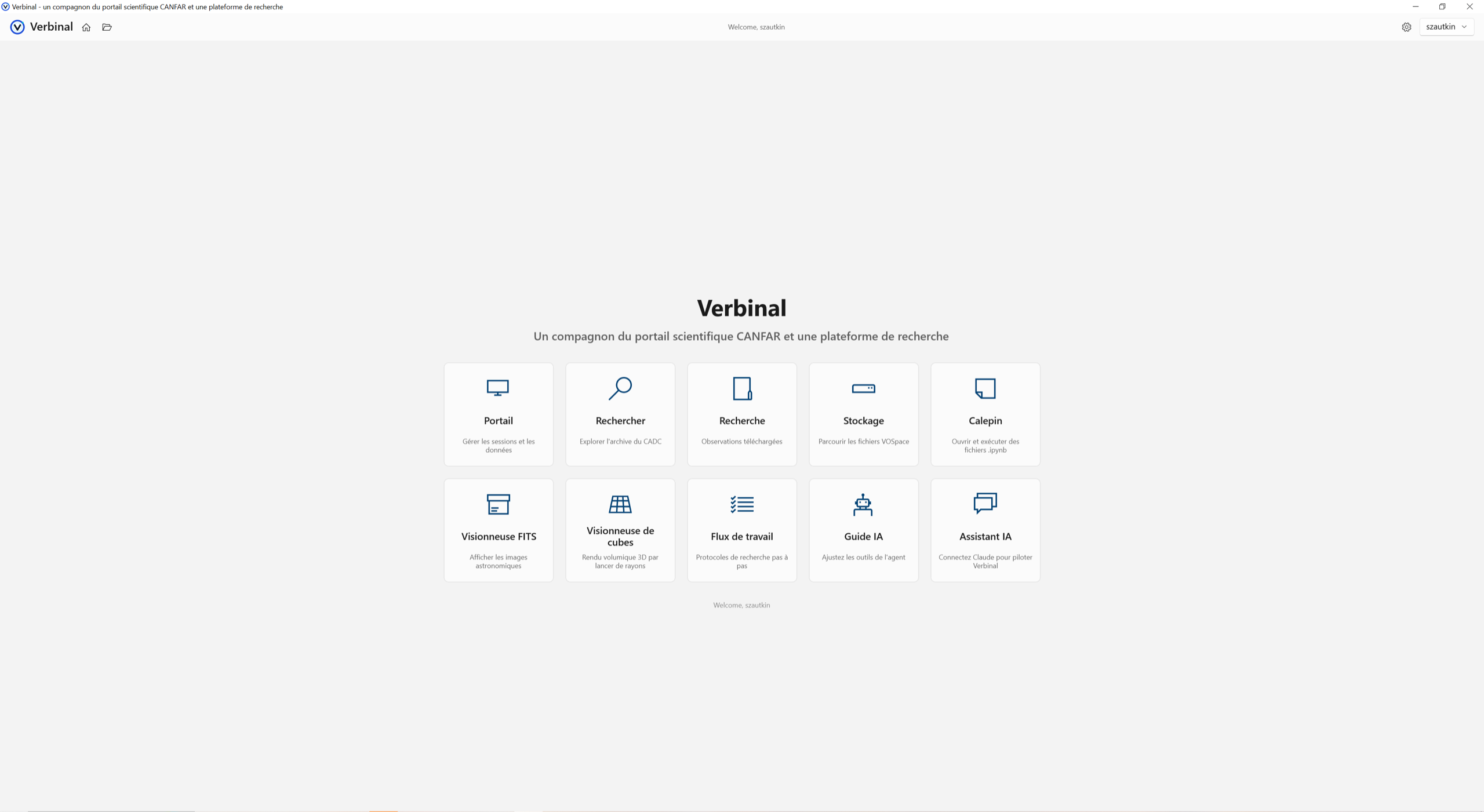
The app is organised as a set of modules, each a tile on the Welcome screen: Portal for sessions and batch compute, Search for the CADC archive, Research for what you have downloaded, Storage for VOSpace, a 2D FITS Viewer, a 3D Cube Viewer, a native Notebook, the new Workflows, and the optional AI Assistant and AI Guide. Portal, Storage, and compute need a free CADC account; Search and both viewers work without signing in, so you can pull a public file and inspect it before you ever log in. There is no telemetry anywhere in the app.
Portal: sessions and batch compute
Portal is the CANFAR control room. Launch and manage interactive Skaha sessions — Notebook, Desktop, CARTA, Firefly — from a Standard form or an Advanced one that takes a custom container-registry image, and follow each session's logs and events live. Beyond interactive sessions, you can submit headless batch jobs with replicas for the reprocessing runs that do not need a screen, and watch them move through pending, running, complete, and failed. Image Discovery shows which software packages a container image carries before you launch it, so you are not guessing at what is inside.
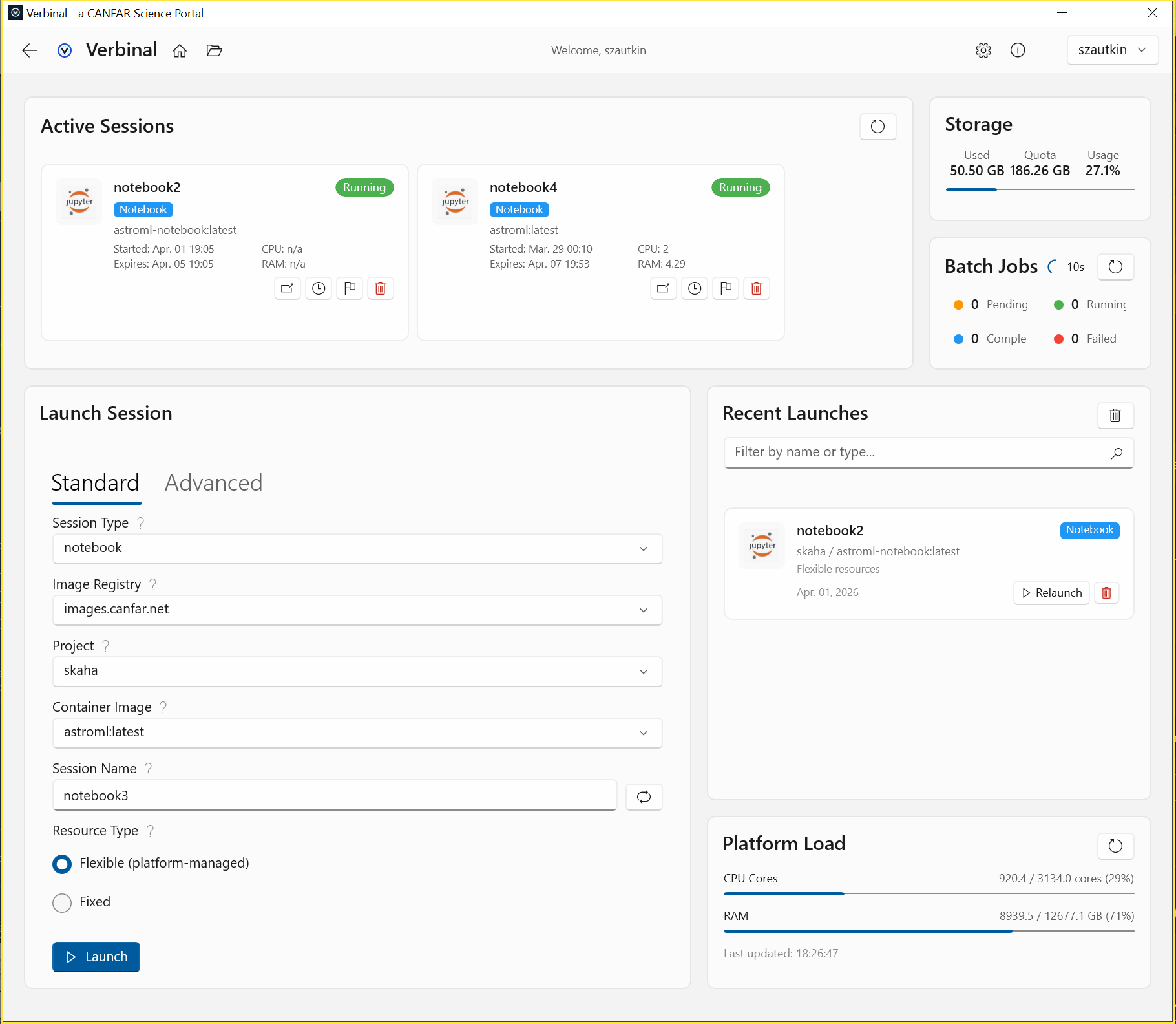
Around the edges of the dashboard sit the numbers you plan around: your VOSpace storage quota, a Recent Launches list for one-click re-launch, and a Platform Load panel with live cluster CPU, GPU, and RAM utilisation. It is the same information the web portal surfaces, gathered into one native view that refreshes itself while anything is pending.
Find it, keep it, store it: Search, Research, Storage
Most projects begin at the archive, and Search queries the CADC directly over TAP — CFHT, JCMT, DAO, Gemini, HST, and more. Do a cone search by coordinate or target name, then narrow with a filterable data train (collection, instrument, filter, calibration level, dates), preview what you find, save the ADQL queries you will run again, run a VizieR catalogue cone search alongside, and download products in one click into your local research archive.
What you download lands in Research, organised automatically, with previews, per-observation notes, and an exportable research bundle you can hand to a collaborator. Storage is a full VOSpace/ARC browser — upload, download, organise, and share files, make a folder public or share it with a group, all with quota tracking. The three modules are meant to be used together: find it in Search, keep it in Research, park it in Storage.
Workflows: research protocols you can check off
This is the headline of 1.3.0, and the piece with no equivalent elsewhere yet. A great deal of astronomy is procedure — the ordered set of steps that turns a question into a measurement — and that procedure usually lives in someone's head, a lab wiki, or a stale README. Workflows makes it a first-class object in the app: a research protocol written as a simple markdown checklist, rendered as a column of numbered step cards you check off as you go.
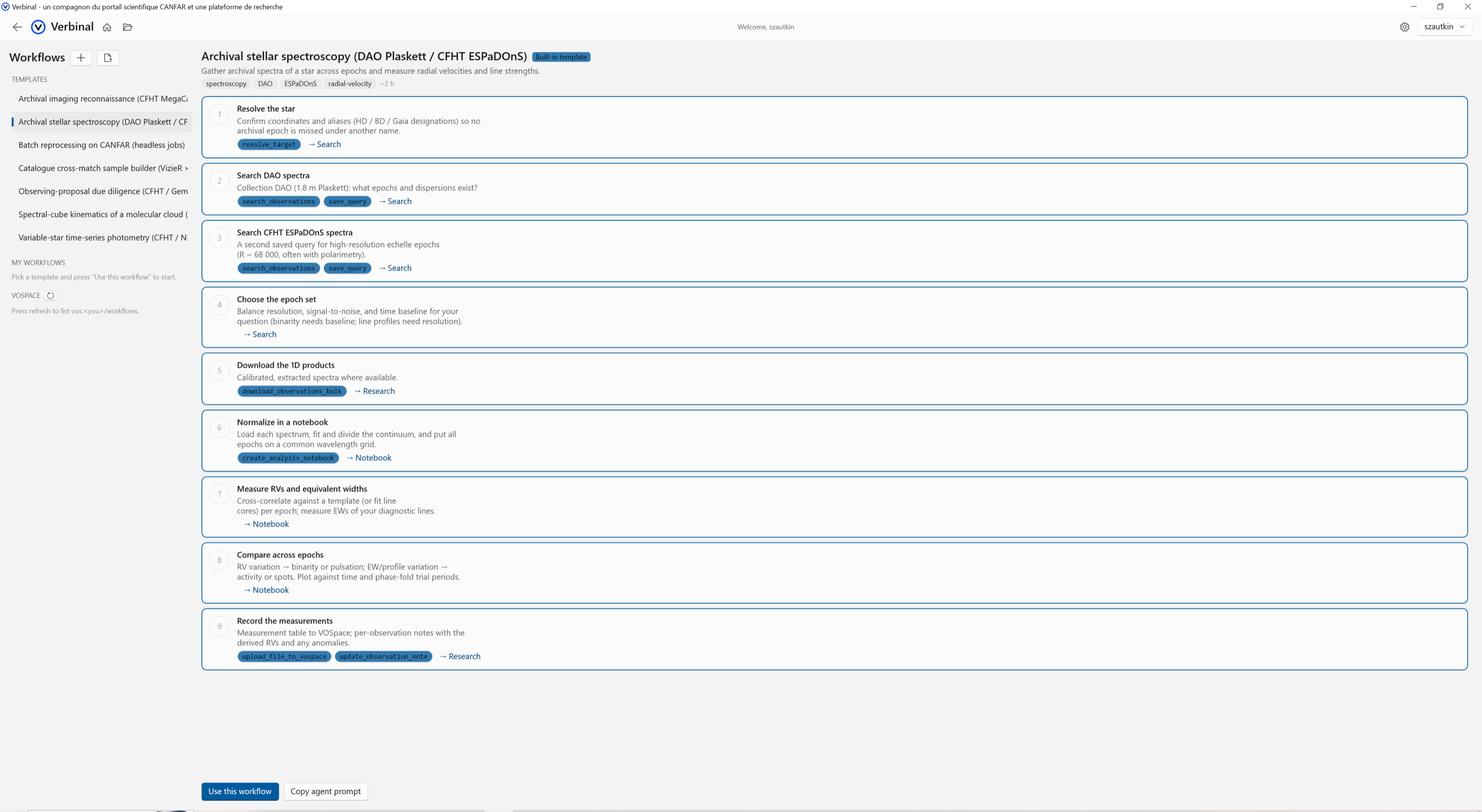
What makes it more than a to-do list is that the steps are wired into the app. Each card names the concrete action it stands for — resolve a target, search observations, save a query, download the products in bulk, create an analysis notebook, upload a result to VOSpace, note it on the observation — and links straight to the module that carries it out, so step 5, download the 1D products is one click from actually downloading them in Research. Verbinal ships seven built-in, Canada-first templates — archival imaging reconnaissance on CFHT MegaCam, stellar spectroscopy on DAO Plaskett and CFHT ESPaDOnS, batch reprocessing as headless jobs, a VizieR cross-match sample builder, observing-proposal due diligence, spectral-cube kinematics, and variable-star time-series photometry — and you can write your own in markdown with a live-preview editor. Store a workflow locally, or share it with your team over VOSpace. And because a protocol is also a plan an agent can execute, every workflow has a Copy agent prompt button — which is where the AI assistant comes in.
An AI assistant that can drive the app
Verbinal for Windows can pair with your own Claude Desktop or Claude Code over the Model Context Protocol, through a guided connect wizard, and let an AI agent operate the app with 115+ tools: search and download, open the viewers, run notebooks, manage storage and sessions, and follow — or author — Workflows. Hand it a protocol with Copy agent prompt and it can work down the checklist; ask it a question and it can go get the answer.
The reason this is comfortable rather than alarming is the control model. You stay in charge. A proposal review strip gates every consequential action — the agent proposes, you approve — and destructive operations always require explicit approval. Every change the agent makes is badged so you can see what it did and undo your trust as easily as you extended it. And the AI Guide lets you tune how the agent sees each tool, so you can widen or narrow what it is allowed to reach for. It is an assistant with its hands visible, not an autopilot.
Two viewers: FITS in 2D, cubes in 3D
Data you can see is data you can trust, and Verbinal brings its own viewers rather than sending you to a browser. The FITS Viewer is a hardware-accelerated 2D image viewer with WCS readout, coordinate go-to, pixel probing, saved bookmarks, multiple stretches and colormaps, a North-Up orientation from the WCS, and multi-tab comparison — a linked crosshair that follows the same sky position across tabs, synchronised zoom across different pixel scales, and a blink mode for spotting transients. It opens fpack-compressed .fits.fz files directly, decompressing RICE in-app.
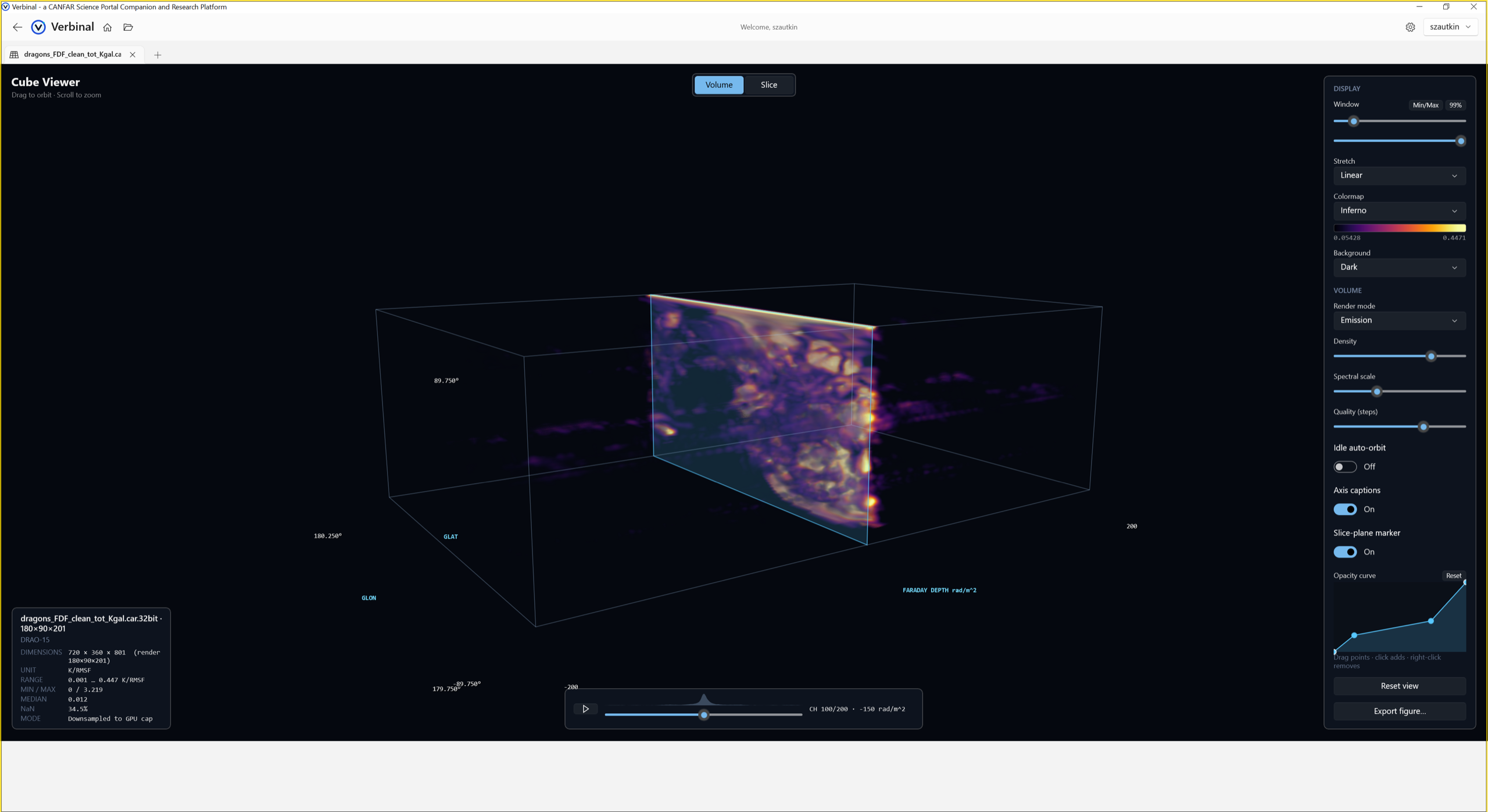
The Cube Viewer is the same idea in three dimensions, and it is the Windows counterpart to the Metal viewer that headlined macOS 1.3.0 — here it is a Direct3D volume renderer. In Volume mode you fly around position–position–velocity space: orbit and zoom, choose an Emission or maximum-intensity projection, and shape a transfer function — density, spectral scale, and an editable opacity curve — until the noise floor drops away and the structure stands out. A Slice mode reads a single channel with WCS sky coordinates and a spectral value in frequency, velocity, or wavelength, and click-to-probe pulls the full spectrum through the cube at any pixel. Along the bottom, a channel timeline with an intensity-waveform scrubber shows the spectral structure of the whole cube at a glance and plays through it; the scientific display controls — scientific colormaps, linear/log/asinh stretches, a percentile window, background choice — carry straight into Export figure, which composes a publication plate with a colorbar and captions rather than a screenshot. It streams large cubes so a survey-scale file opens promptly instead of becoming a question about memory.
Notebook: native Jupyter with a local kernel
Some analysis wants code, and Verbinal for Windows runs it in place. The Notebook module edits and executes .ipynb files natively against a local Python kernel — no browser, no server to start, no JupyterLab tab to babysit. Open several notebooks in tabs, run cells or the whole book, see matplotlib figures render inline, and rely on autosave and recovery so a crash does not cost you the session.
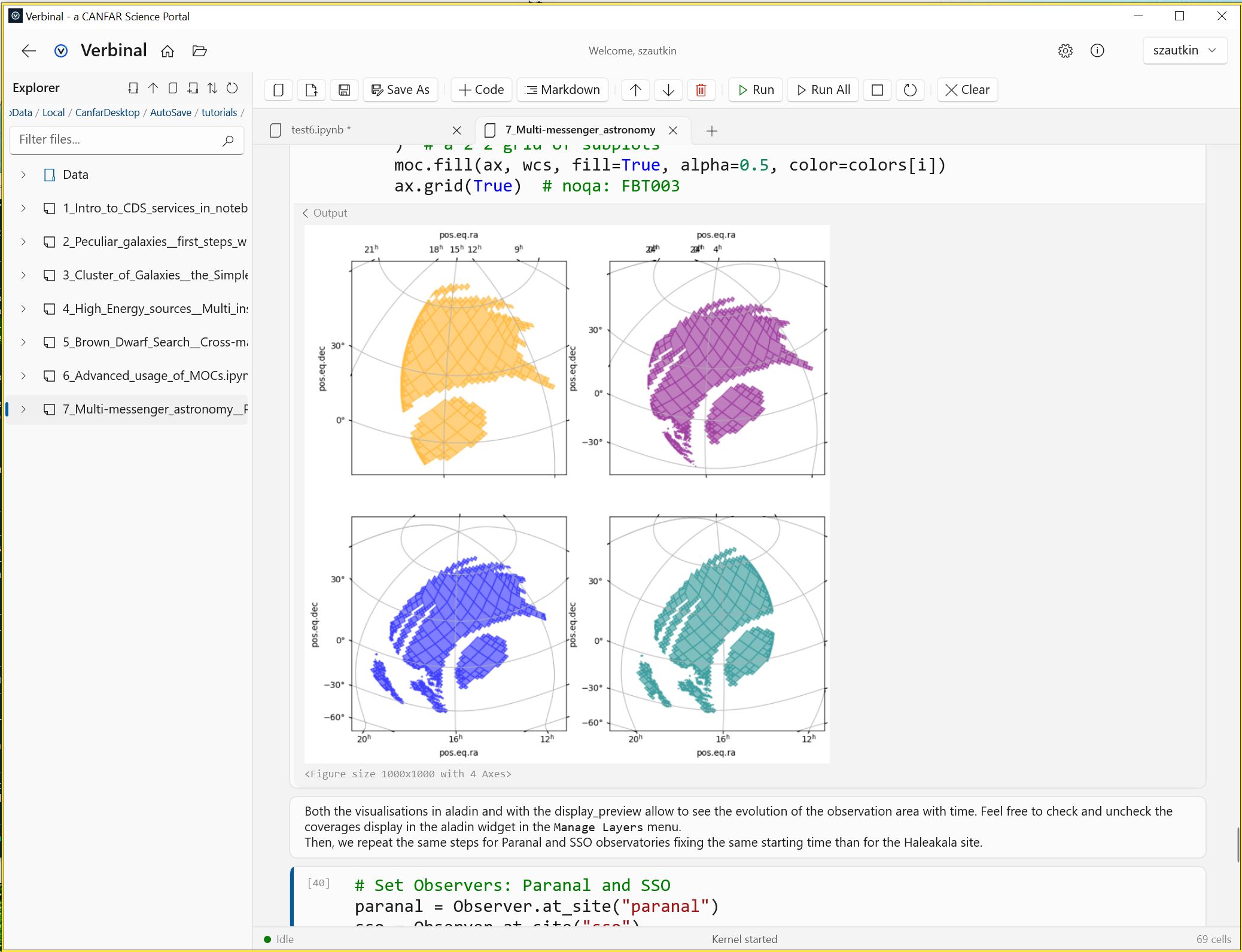
.ipynb files, Run / Run All, and matplotlib output rendered inline. No browser, no server.The tie-in with the rest of the app is the point: from a downloaded observation in Research you can seed a ready-to-run analysis notebook — quick-look imaging, aperture photometry, cube moment maps — so a Workflow step like normalise in a notebook lands you in a real, populated notebook rather than a blank cell. Running notebooks needs Python 3.8+ on your machine; everything else in the app does not.
Built the Windows way — and how it differs from the Mac
Because Verbinal is written natively on each platform, the Windows app is not the Mac app recompiled — it speaks Windows idiom throughout, and a few differences are worth naming outright if you have used it on a Mac:
- Toolkit. WinUI 3 on the Windows App SDK with a Mica backdrop and Fluent design, where macOS is SwiftUI. The result feels at home next to File Explorer, not ported from elsewhere.
- 3D rendering. The Cube Viewer uses Direct3D; the macOS viewer uses Metal. Same capability, each on its platform's own GPU stack.
- Credentials. Tokens are stored in the Windows Credential Manager (PasswordVault); on macOS they live in the Keychain.
- Distribution and licence. Windows ships as a packaged MSIX on the Microsoft Store and is open source under AGPL-3.0; the Mac app is on the Mac App Store under MPL-2.0.
- Requirements. Windows 10 (1809) or newer, and Python 3.8+ if you want to run notebooks.
And a difference in emphasis: the native Notebook and Workflows are front-and-centre on Windows. Under the hood, 1.3.0 also brings editable service endpoints for every CANFAR/CADC host with a connection self-test, in-app fpack (RICE_1) decompression, full French localization, and more reliable expired-session handling, on top of a large suite of macOS-parity, 4K-layout, notebook, and MCP fixes. The project ships with 1,500+ tests covering the FITS parser, WCS transforms, the notebook engine, the ADQL builder, VOSpace, MCP tool routing, and more.
Privacy, source, and how to get it
The privacy posture is the same one every Verbinal app keeps. No data collection, no analytics, no third-party services. Your CADC credentials stay in the Windows Credential Manager, and network traffic — archive searches, storage transfers, session management — goes directly to CANFAR and CADC over HTTPS, with nothing in between. Data you open in the viewers is read and rendered on your own machine; the cube you turn in 3D is never uploaded.
Verbinal for Windows is free and open source under the GNU Affero General Public License v3.0, with the full source at github.com/szautkin/CanfarDesktop — the FITS parser, the WCS handling, the renderers, and the MCP tool layer described here are all things you can read rather than take on faith. Install it from the Microsoft Store, open a tile, and — if you like — start from a Workflow template and let it walk you from the archive to a figure without leaving the desktop.
Get Verbinal for Windows
Free and open source. Windows 10 (1809) or newer and a free CANFAR account. Search and the viewers work without signing in — and your data stays on your machine.
